Submitted by Bob Bhatnagar on
If you can't login to YouTube on the iPhone, there are simple steps you can take to allow the native YouTube app on your device to connect. The problem arises when your linked Google Account does not have an application-specific password set up for your iPhone YouTube app.

After repeatedly trying to login to your YouTube account with the correct username and password, the iPhone prompts you to login from Safari. Even after following through this process, the YouTube app refuses to acknowledge your credentials are correct. The iPhone error states wrong username or password.
To correct the problem, you must first activate 2-step verification on your Google Account. After this is complete, you can create an application-specific password for the iPhone. After failing to login to your YouTube account from the iPhone app, open a web browser on your computer.
Navigate to Google.com and click the Sign In button to open your Google Account. Once you are logged in, click your email address and choose Account from the drop down menu. Click Security -> Authorizing applications and sites -> Edit. You may see a screen like the following:
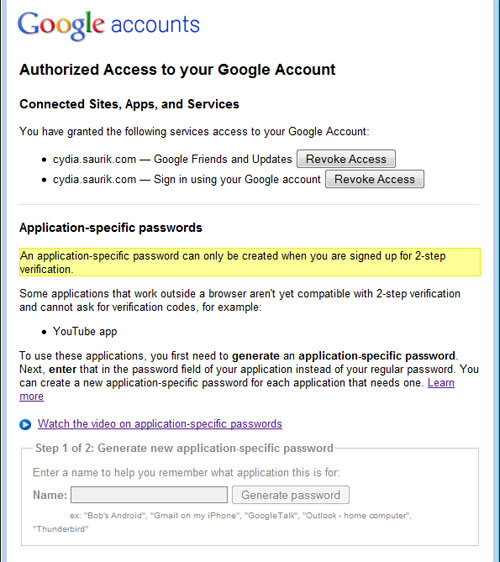
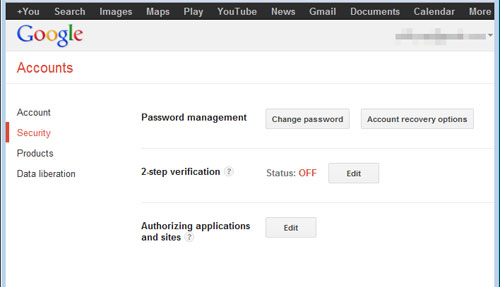
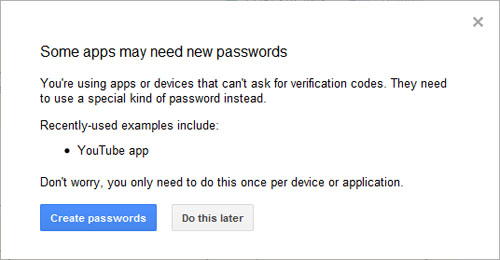
After clicking the Edit button, follow the steps to enter a phone number for 2-step verification. Once complete, Google will send a text message or voice mail to your phone with a verification code. Enter this into the box and this will confirm you have set up 2-step verification. A pop-up box like the following may appear:
Newest iPhone FAQs
Click the Create passwords button. If this dialog box does not appear, navigate to your email address again and click Account. Choose Security -> Authorizing applications and sites -> Edit. If prompted re-enter your Google password. You now have the option to generate a new application-specific password. Name your password something you will remember such as "YouTube" and click Generate password.
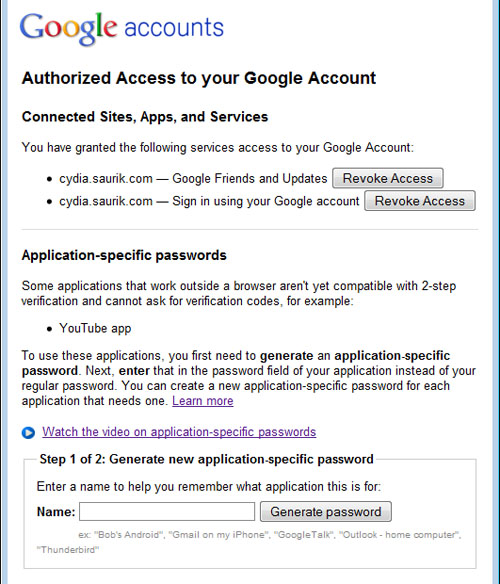
Google will generate your application-specific password and display it once. Do not close this window until you have followed the next step.
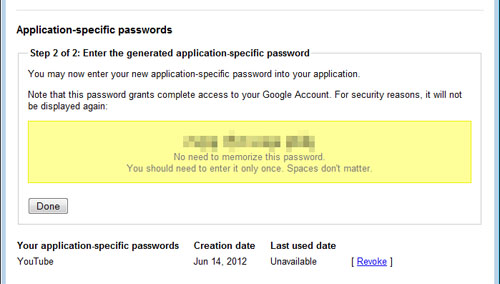
On your iPhone, open the YouTube application. On the bottom menu touch More -> Sign In. Enter your Google Account email address (NOT your YouTube username), followed by the application-specific password in the yellow box on your computer web browser.
You should now be logged into your YouTube account on the iPhone. If you ever need to generate a new application-specific password, you can accomplish this using your Google Account on the computer.
Comments
Lisa replied on Permalink
I've followed these instructions to the letter, but after entering the password into Youtube, it STILL says 'Authentication Failed. The username or password you entered is incorrect." Please help!
Anonymous replied on Permalink
I still doesn't work! :-( I get the same message. Help!
Aiko replied on Permalink
Yup, me too. All goes smoothly until I signed in to YouTube and it is still Authentication Failed.
Anonymous replied on Permalink
Just helped my mom out with this...she set up the 2 step verification and app specific pass word and it didnt work heres how we fixed it
Follow these instructions above but you also have to log into youtube, click the upload video button and it wil give you the option to create user name......Create a new user name, then use this new username and app specific password to sign in
GOod luck this should work
ban91ANNA replied on Permalink
Thank you so much! It worked!!!!
Anonymous replied on Permalink
it wont work for me i made a 2 step verification i changed the name of the account but it still says authentication failed
Sandra replied on Permalink
Have you tried entering the password with spaces. That worked for me.
Anonymous replied on Permalink
Doesn't work at all. Thank you Google for overcomplicating things and in the process completely making the YouTube app unusable. You should all be fired.
Anonymous replied on Permalink
apple need to sue those google fags!!! this is outrageous!!
Anonymous replied on Permalink
I agree 1000000% I cant share my videos to face book ...doesn't have the frigging option and I cant get it onto my youtube acct or wall!!~!!LEAVE THIS SHIT ALONE! FIRE THEM !!!!
Anonymous replied on Permalink
Followed this to the letter and i am still unable to sign into the youtube account that was working just fine this time yesterday... So this information is out of date
Anonymous replied on Permalink
I HATE THIS
why won't it work
Jeff replied on Permalink
wow... completely useless!
no thanks
J
Anonymous replied on Permalink
cant find the security button on my google account
Anonymous replied on Permalink
you have to scroll down and hit desktop,,,,but it still wont work! BULLSHIT!
Anonymous replied on Permalink
same for me, ive been pissing about all day on this trying everything and nothing working. Anyone with a solution after trying a rename username....I dont even get the create username option when clicking upload video button going through my computer...help help help.
Annie replied on Permalink
It worked for me, but there is a typo in the article. It says to name your password something easy like "YouTube." He meant name the application YouTube. Then, when I logged into the YouTube app on the iPhone (by pretending I wanted to upload a video from my Camera Roll to YouTube), I used just the main part of my Google email without the @gmail.com as the username login.
FYI, at the start, I didn't follow his instructions to repeatedly login to the YouTube App until It prompts you to use Safari. I had gotten the incorrect username or password error a couple of times before I tried what this article said to do.
However, I need to do more investigation, but I just realized that my email on my iPad is now telling me my password for my Gmail account is incorrect. So, I don't know if this is a coincidence or due to the changes I made to my iPhone.
Annie replied on Permalink
Update...yes, the two step verification broke my email on everything I had (iPhone, iPad and MacBook), so I decided that the convenience of having email on these devices was more important than being able to upload to YouTube. I could have set up a two-step for email too, but why bother...
Celeste replied on Permalink
Reed bed technology has a low price of entry and minimal daily functional and upkeep costs.
This tool is a long, hollow, transparent piece of plastic branded
with one-foot accretion. Nitrogen-deficient grass invites the
growth of moss.
Anonymous replied on Permalink
Nothing works! legacy account doesn't work either. At this point I don't even care about all my old stuff, I just want to start over. But I can't just create a new youtube account cause it is linked to you google account. Great Work!
Chi replied on Permalink
I tried this to the letter and it didnt work. Here's what does work.
TURN OFF the 2 step verification process. As soon a I did that, my app was able to connect with my youtube account.
Anonymous replied on Permalink
Unbelievable, but this worked. I must say I'm very frustrated with Google for making this so complicated. I followed all the steps in the article above to activate 2-step only to see this comment above. So I then went back and deactivated 2-step, went back to my iphone, opened the old native iphone youtube app and attempted to login with the same gmail address I was trying to use before (not my YT username) and the same password. And it worked. Unbelievable. Get it together Google.
Nubi's mom replied on Permalink
I struggled with this for hours after YouTube suddenly stopped working on my iPad. The instructions are perfect. You HAVE to remember to use your google email to log on instead of the user name that they told you to use a few weeks ago.
Anonymous replied on Permalink
after hours wasted...user name type full email address.......and it worked for me! WHY couldnt anyone in google mention such a fundimental step? Come on someone come up with a better site and put google into the history!
Frank replied on Permalink
A newsletter is an effective element for any dog training website.
On the other hand, if the person is an early adopter, likes to make
a statement or wants a personalized gift, then she will likely search
the Internet. How to use expired domains to skyrocket your
traffic.
Anonymous replied on Permalink
Fuck you, Google. I've followed the instructions in this article to the letter, as well as trying all the suggestions in the comments, and I still can't access my Youtube account on my phone. Great work over-complicating everything.
FrozenFist replied on Permalink
This worked, thank you so much, I have tried everything, and had no Idea what there was else to do, this has made my life so much easier thank you, thank you, thank you.
Anonymous replied on Permalink
Thanks Google. I just tossed my piece of crap I phone in the trash. I'm done.
Anonymous replied on Permalink
This worked. I went to google under the security tag and set up 2 step verification. Next under Apps Passwords. I selected youtube on iphone. It gave me a password which I used and it seems to have worked. I am currently uploading a video.
Gertrude44 replied on Permalink
Thanks for creating the page! Im positive that it will be very popular. It has good and valuable content which is very rare these days. liebhcadf
Pages