How do I view and clear my Google Chrome browser history? (iOS)
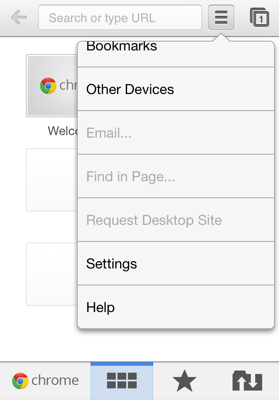
To clear your Google Chrome browsing history go to Menu > Settings > Privacy. You can choose from four options: Clear Browsing History, Clear Cache, Clear Cookies, Clear Saved Passwords, or you can just clear everything by choosing "Clear All".
To view and delete individual pages type "chrome:history" in the address bar. You can then tap the drop menu at the right of each item to view more history for that page, or to delete that individual item. You can also remove multiple items by tapping at the left of them. To clear all your browsing history just tap the "Clear Browsing History" button at the top of the page.*
*Typing "chrome:history" in the address bar only works on Android devices.
UPDATE: (07/17/13) Google Chrome Version 28.0.1500.12 for iOS adds the ability to view your personal browser history. Just navigate to Settings > History. You can also click the "Clear Browsing Data" tab at the bottom of the page. This will take you to the privacy settings so you can clear your browsing history, cache or cookies/site data.
Comments
Stith Dehere replied on Permalink
http://www.youtube.com/watch?v=4ILHNHJvJkA
Watch this video, and remove junk files on your iPhone
Moris replied on Permalink
Thanks for the tips. If you want to quick delete all things on your iPhone, this tutorial will be much faster:
http://www.safewiper.com/tutorials/clear-browser-cache-and-cookies-on-iphone-ipad.html
The IT Guy replied on Permalink
Watch the video tutorial for this http://www.youtube.com/watch?v=OvS8Z9NBiJ4