How do I uninstall an iPhone AppStore application?
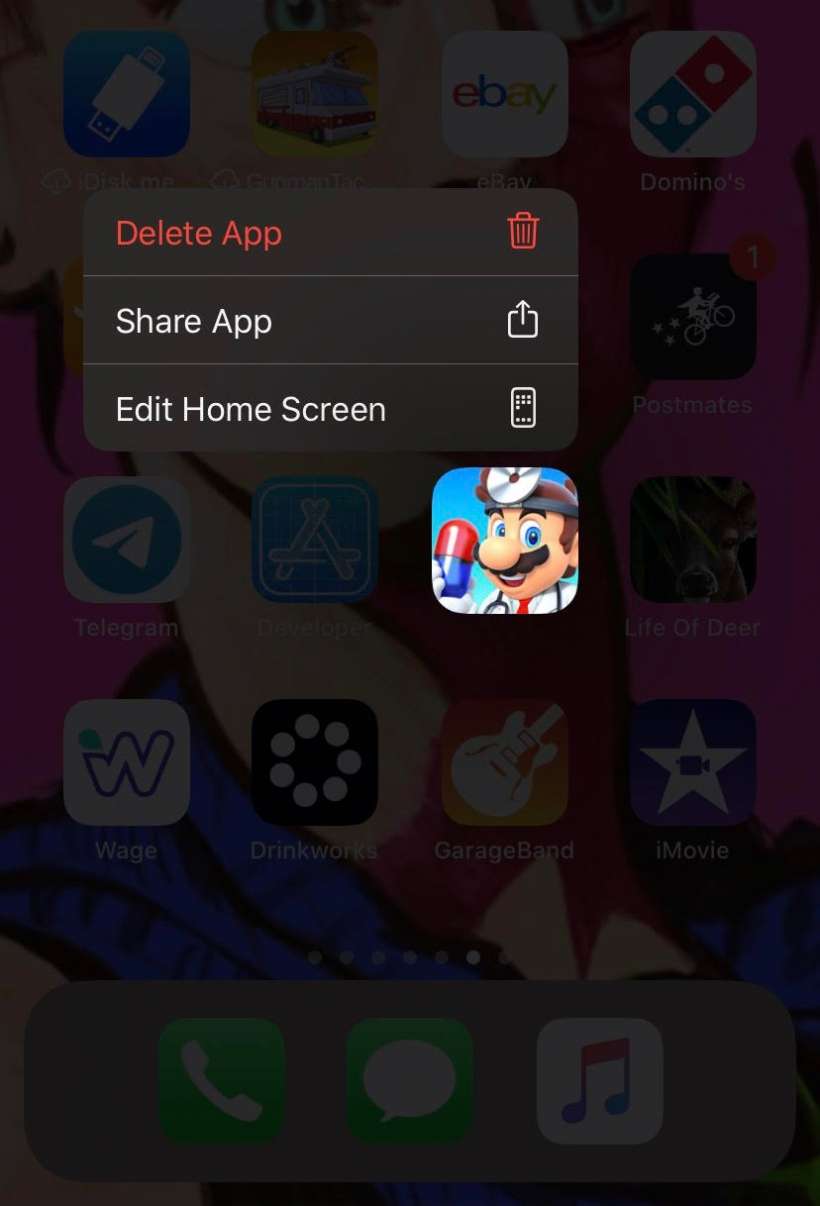
To uninstall an application purchased or otherwise installed from the Apple App Store, simply do the following:
- On devices running iOS 13 or later hold your finger on the icon for the application you wish to uninstall (the same action you take to move or re-arrange home screen icons). On devices running iOS 14 or later you can hold your finger anywhere on the Home screen to make all apps on the Home screen wiggle.
- Click the "x" in the upper left hand corner of the icon for the application you wish to remove. In iOS 14 or later tap the the minus (-) sign in the upper left-hand corner to delete an individual app.
You can also use Touch ID to bring up and individual app menu to remove an app from your device. Just use a long press on the app icon you would like to remove then tap the Delete App tab from the app menu.
If you want to re-install the application at a later time, simply visit the AppStore and select the application again.
tags:
Comments
Anonymous replied on Permalink
I deleted a free game, and i want it back for free again,. I have heard that you can just find it again and reinstall it, but i have searched everywhere for it and can not find the application anywhere.
erica replied on Permalink
hey please help i want to delete apps for my iphone and did not show the 'x'
Anonymous replied on Permalink
Mine doesn't show an "x" either :(
Ellis replied on Permalink
MINE DOES NOT SHOW AN X
Bobby A replied on Permalink
Sorry but this is incorrect.
If you have an app that you downloaded from iTunes sure you can cause the icons to vibrate and click the "x" on your iPhone to remove it.
However when you sync with iTunes you have the opition to "uncheck" the box alongside the app you want to remove and it won't be re-installed back on your iPhone.
The preferences has really nothing to do with syncing apps it's purely an option that you decide whether you want the app on your iPhone or not.
swathi reddy replied on Permalink
thats right i found few answers in a forum forum similar to this.
Ronny replied on Permalink
I still am unable to find a true answer to this.
I have removed the app from my App list in iTunes.
I have removed the app from my iPhone.
However, when I go into the "iTunes Store", then "App Store", I go to "Purchased", I see the app still there. I don't want to see this app there anymore. Is there a way to remove it from there?
Thanks
RV replied on Permalink
1. Connect your iPhone to a computer with iTunes, let it synch, then go to the left panel of iTunes and click on iTunes Store.
2. When teh store opens, click App Store on the black top bar.
3. You will see the App Store screen, make sure you select the iPhone buttom
4. On the right hand side of the screen you will see a list of App Store Quick Links. Click on the link that says Purchased.
5. This should open the list of everything you ever purchased for this phone with this user ID.
6. Hover the mouse cursor over the app you want to delete, and an X will appear. Click on that X and say yes to the question that will appear, to hide the app.
7. Synch your phone again, just to make sure.
This worked for me. Good luck.
Anonymous replied on Permalink
Loved this answer!!! I always wondered how to get the apps that I didn't want anymore to not say Installed. Thank you so much!
Anonymous replied on Permalink
But this just hides it and doesn't delete it. I've tried all the rest of the suggestions and still have purchased apps. HELP!
Vincenzo replied on Permalink
Yeah, that's just one of the things you have to take into account when going the iPhone route. It's not open like the whole Android movement. Using iTunes and the Apple AppStore is just a small price to pay, however, for having a closed, yet controlled and uniform system. Just imagine all the problems and headaches Android developers have to go through when dealing with so many different phone models.
Vincenzo
http://www.plentyoffishlogin.org
<a href="http:/... replied on Permalink
Yes i think
Gary Bisaga replied on Permalink
Thanks for posting this! I was going crazy trying to figure out how to delete applications without going back to iTunes on the computer.
Thesis Writing replied on Permalink
the iphone doesn't have anything that a PSP doesn't have except multi-touch. PSP has full internet even the ability to download files, even flash support (which the iphone doesn't have), mp3, aac, WMA (not on the iPhone), pics, mp4, h.264, movies via UMD or memory stick, REMOVABLE BATTERY. Plus the PSP only costs $170 70 for 4gb of memory. So for less than half the price you get all the features with the same screen size just no touch screen which I could do without. I thought I heard the PSP played all these cool videos games too but IDK!!
Anonymous replied on Permalink
The iPhone is a SMARTPHONE. The PSP is a video game system that your parents bought you. They are not the same thing, not even the same category. Fly away Sony Fanboy, fly away.
Anonymous replied on Permalink
umm. . . . a Phone!?!?!
Anonymous replied on Permalink
Can u call someone with a psp?
Anonymous replied on Permalink
ALL you have to do is delete them from both the iphone and the itunes...sheesh u guys are breaking your heads..
Anonymous replied on Permalink
Will deletion of Yahoo messenger application from my iPhone device remove it entirely (delete the account?)? Or just delete it from iPhone.
I just want to delete it from iPone
Anonymous replied on Permalink
I recently had my Iphone 3g jailbroken until I mistakeningly hit the restore button on the back-up program found in cydia yesterday. Once I hit this button the iphone started like it was going to restore, only to stay locked up. I then tried to turn the phone off and on with the top power button. Nothing... Then i was able to get the phone to restore mode. Once getting it into restore mode i then sync it with itunes and got all my information back. With the exception of the jailbreak patch. I tried to jailbreak the phone again, but this time it went through the entire process on the computer but would not reboot when completed. So, again I had to sync with itunes and get my information back. Now, the problem that I am having is that Facebook, MySpace and some other apps fail to show up on my screen; however when i look in settings > General > and scroll toward the bottom i can see the apps listed. What is the deeal with this. I try and re-download the app and it tells me that it is already installed and wont allow me that option. Once the iphone is jailbroken, does some of the jailbroken information stay inside itunes? The reason i ask is there are some things that i see on my supposed unjailbroken iphone that i only used when it was jailbroken. Can anybody help me out and give me some advice in a direction to go without calling AT&T.
w replied on Permalink
Hey I have a similar problem to the second part of your inquiry. I deleted facebook by holding the icon and selecting the little X. It asked if i wanted 2 delete all the data and I said yes. However, it still shows up under the settings when I scroll to the bottom. Funny thing is that its an empty folder that just says facebook.
Please let me know if you or anybody can help. Thanks!!
Anonymous replied on Permalink
Hey guys and girls
I'm having a similar problem, I was having trouble logging in to my facebook account through the app so I deleted (by holding and pressing "X") it in a hope to later download it again, but when I go to the App Store on my 3gs it is listed as "Installed" still. It's definately no longer on my home screen and I also have an empty facebook file in my settings... Does anyone have any ideas how I can get the app back to my phone?
The down side to this is after having my 3gs for nearlly 6 months I still have not sync'd it with my computer... Everything I buy and download comes from the iTunes store or App store on the phone it's self... I hope this isn't an issue... I would be very greatful if somebody could get back to me...
Thanks for your time guys :)
Anonymous replied on Permalink
I'm having the exact same problem and can't figure out how to resolve, did you ever get yours resolved?
I've deleted and reinstalled before on my iphone, but for some reason it's not working anymore and still shows it as "installed" when in the app store. I've tried syncing and restoring but nothing is bringing back the FB app.
Any tips?
Anonymous replied on Permalink
Hey.. I know you posted this awhile ago.. but wondering if you figured it out yet!!! I am having the same problem as you, and I have tried everything that has been suggested.. but to no avail.. I don't have a firewall block.. I've tried resetting it... I've tried it all.. very frutruated.. In fact, when I try to access my itunes from my personal computer.. it won't connect.. did everything that was suggested for that.. too!!!
E1 replied on Permalink
Hi there...I have similar situation, I deleted the application, syncing it and I still have the empty boxes on my screen. What happened was, I updated the application from my phones and it caused my prepaid balances become "0" within seconds. Those empty boxes are with " waiting status". Have you resolved how to get rid of those empty boxes ?
Anonymous replied on Permalink
did you ever find out how to fix this problem?? Im having the same. It sucks
Anonymous replied on Permalink
just rejail break
http://blackra1n.com/
it happend to me to but this unlocked it for me again
Rob replied on Permalink
Simply delete the app in your library by clicking "Applications" in the source pane, and then selecting the app, and pressing the delete key. Then sync your phone and it will be deleted.
koozies
Anonymous replied on Permalink
STILL can't remove apps from the list in iTunes (PC).
Anybody got a quick tip - or do I have to go find the folder in PC.
John Gannon replied on Permalink
If you sync your phone to iTunes it will automatically reinstall it. In order to keep that from happening you either have to specify which applications sync in the iTunes preferences for the device, or you have to delete the application from both iTunes and the iPhone/Touch.
club penguin
Pages