jailbreak

iPhone Dev-Team Releases Redsn0w Update [Version 0.9.15b1]

The iPhone Dev-Team has released redsn0w version 0.9.15b1. The update brings a lot of changes for restoring to older firmware. It also now includes Cydia for the tethered iOS 6 jailbreak on A4 devices. iPhone 3GS and iPhone 4 owners can learn how to jailbreak their devices running iOS 6 by clicking here.

Cydia jailbreak app store icon

The changelog has a lot of information. The Dev-Team suggests visiting the comments section on their blog if you're confused or have any questions. This is also where you can get the download links for redsnn0w v.0.9.15b1.

"We realize there’s a lot of info in this post. If you’re at all confused about things remember to visit our comments section, with our very helpful user base and moderators like dhlizard, Frank55, 41willys, and slavakulikoff."

Absinthe Co-Creator Not Working on iOS 6 Jailbreak

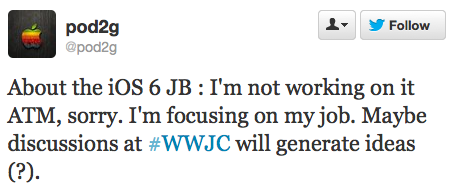
Absinthe co-creator pod2g dropped some disappointing news on the jailbreaking community on Tuesday. The iOS hacker announced he's not working on a jailbreak for iOS 6. Pod2g is mostly responsible for the last untethered jailbreak most jailbreakers are currently using today.

iOS 6 Jailbreak

Pod2g's announcement doesn't mean a new jailbreak is not in the works. Another iOS hacker known as Chpwn, tweeted an image of a jailbroken iPhone 5 with Cydia installed over the weekend. This is a good sign that a public iOS 6 jailbreak could be available in a few months.

New Cydia Tweak Allows Siri to Perform Local Searches Outside of the U.S.

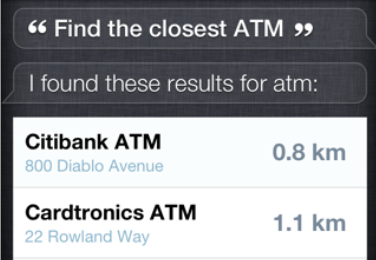
Here is a great Cydia add-on for international travelers. International Locations for Siri allows Siri to perform local searches outside of the U.S.. While Siri can speak several languages, and is also available in other countries, location based services are currently only available in the U.S..

iPhone Tweak

I obviously can't test the tweak without leaving the country, but the $0.99 investment may be worth the risk to some frequent travelers. The add-on is available for download via the BigBoss repo. If you do not already have AssistantExtensions it will be installed when you download the tweak.

iOS 5.1.1 Untethered Jailbreak Only a Few Days Away

Pod2g is only a few days away from releasing the first untethered jailbreak for iOS 5.1.1. The iOS hacker tweeted: "Thanks to awesome work of @planetbeing and @pimskeks, we're near ready for a release. Now it's a matter of days." Pod2g previously announced that "something big" was going to happen at the Hack In The Box security conference in Amsterdam.

iPhone Jailbreak

Pod2g recently added the iPhone 3GS and iPod 3G to the list of supported devices. The AppleTV 3 is currently the only device that will not be supported. The Chronic Dev Team will release the jailbreak tool when it's ready for the public.

Pod2g Adds the iPhone 3GS and iPod 3G to List of Supported Jailbreak Devices [iOS 5.1.1]

iOS developer pod2g is only a "couple of weeks" away from releasing his new jailbreak for iOS 5.1.1. He previously announced that he had successfully tested the jailbreak on the original iPad, iPad 2, new iPad, iPhone 4 and iPhone 4S. Meaning that the iPod 3G, iPhone 3GS and ATV3 would not be supported. On Friday, pod2g announced that both the iPod 3G and iPhone 3GS will be compatible with the new jailbreak.

Jailbreak iOS 5.1.1

"Good news. We've found a way through for iPod 3G and iPhone 3Gs users. Upcoming jailbreak will be compatible."

There was also some confusion over what iPad models would be supported, but it seems safe to assume that the iOS 5.1.1 untethered jailbreak will work with every version of the iPad. Pod2g hasn't officially tested the iPhone 3GS, or non-Wi-Fi iPads yet, but he has said that they "should work." Read on for his complete list of tested devices for the upcoming jailbreak.

New A5 Jailbreak Works With iOS 5.1.1

Pod2g has confirmed that his newest jailbreak works with iOS 5.1.1. As you can see from the video posted below, pod2g has jailbroken an iPad 3 running iOS 5.1. On Friday, he tweeted that the same untethered jailbreak works with Apple's iOS 5.1.1. This means new iPad or iPhone owners with 5.1.1 pre-installed (or those who accidently updated) will be able to jailbreak their devices once it's released.

iPhone Jailbreaks

The latest untethered jailbreak should work on all iOS devices, including the new iPad and iPhone 4S. Pod2g has not given an ETA on a public release, but with all the progress the jailbreaking community has made recently it should be soon.

iPhone Tweak Makes Texting Even Easier

There have been a lot of useful jailbreak tweaks released this year. For example, I love AssistantExtensions, which allows you to make Siri even better. However, SwipeSelection is quickly becoming my new favorite jailbreak tool.

iPhone Jailbreak Tweak

The tweak is based on a YouTube video created by Daniel Hooper. Hooper published a concept video that demonstrated how editing text on an iPad could be easier. The jailbreaking community responded by creating SwipeSelection based on his ideas.

It's a simple tweak that makes typing on your iPhone much easier by allowing you to drag your finger to move your cursor. You can use one finger for a more precise cursor drag, or two fingers to move faster. You can even select text easier by holding the shift key and dragging your finger. All of this is demonstrated by Hooper's video posted below.

Dashboard X: Add Notification Widgets to the iPhone Home Screen [Jailbreak Tweak]

The highly anticipated jailbreak tweak that allows you to add Notification Center widgets to your iPhone's Home screen is finally available in Cydia. Dashboard X is available for download for $1.99 via the ModMyi repo. It's compatible with all iOS 5 devices, and works with all existing Notification widgets.

iPhone Cydia Tweak

Dashboard X is easy to use: Just tap and hold to enter wiggle mode. Tap and hold again to access the "Add New Widget" screen. This will display a list of all the Notification Center widgets that you currently have installed on your device. Select the widget you want to add, tap "Add Widget" and it will appear on your Home screen. Position the widget wherever you want, and hit the Home button to exit and lock the widget into place. You can delete the widget by going back into wiggle mode and tapping the (x) like you would normally do to delete an app. You can also remove widgets from the Settings menu by going to the "Enable Widget" panel.

Pod2g: My iPhone 4 Running iOS 5.1 is Now Untethered [Jailbreak Update]

Corona developer pod2g tweeted a quick update about his iOS 5.1 jailbreaking progress. The iPhone developer wrote: "Heya! My iPhone 4 running iOS 5.1 is now untethered." In April, pod2g announced that he had acquired all the exploits required to complete a new jailbreak. This latest announcement is good news since it shows that he has made some progress since we last checked in with him.

iOS 5.1 Jailbreak

iOS hackers have been busy working on a new exploit since the release of the iPad 3 in March. Dev Team member MuscleNerd and Chpwn both tweeted pictures of a jailbroken iPad 3 running Cydia 1.1.5 shortly after the tablet was released. However, Chpwn warned that a new jailbreak "could be months away from a public release."

Jailbreak Tweak Makes Arranging Icons Easier

AlwaysArrange is a simple jailbreak tweak that allows you to easily rearrange your Home screen icons without having to enter wiggle mode. Once installed you can tap any icon and move it anywhere on your Home screen. There is a Settings mode that allows you to toggle AlwaysArrange on and off, and you can also adjust the duration of the tap and hold time that it takes to move an app. To delete an app just tap the icon and slide it up to the status bar to enter wiggle mode.

Jailbreak Tweaks
Syndicate content