Voice Control

Nuance Announces Nina, a New Voice Assistant for iOS and Android Devices

Nuance Communications' technology is what powers Apple's mobile voice assistant Siri. The company's voice recognition engine can also be found in dictation software like Dragon Dictation and even in devices like Smart TVs. Nina is the company's response to the growing popularity of intelligent personal assistants that are popping up on all Android and iOS devices

Voice recognition technology

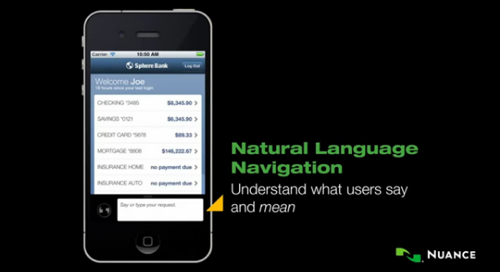
Nuance Communications describes Nina as "the first virtual assistant customer service app to incorporate both speech recognition and voice biometrics into a single integrated solution." Nina uses a combination of Nuance technologies like speech recognition and voice biometrics to understand what a speaker is saying and to identify who is speaking. This allows Nina the potential to perform such tasks as paying bills, or the ability to use other personal services without the need to enter a password.

Proxy Server Allows Siri to Control Other Devices

The list of devices Siri can voice control is getting longer thanks to the efforts of developers who are thinking outside of the iPhone 4S box. It all started when Applidium reverse engineered the Siri protocol and posted the files for anyone to use.

Siri icon

A developer named plamoni took the process a step further by creating an extensible Siri proxy server, which allows Siri to interact with other devices on a network without jailbreaking the iPhone. He successfully used his iPhone 4S to control a Wi-Fi enabled thermostat using the software.

How to Use Siri to Dictate Text to Your Computer

The fact that Siri is limited to the iPhone 4S is a huge limitation for some users who would like to use the technology for other applications. Desktop computer software designed for voice dictation of text with similar accuracy to Siri can be expensive. Luckily, there's a method to use all of the power of Siri on your iPhone 4S to dictate words to any text field on your Mac, Windows or Linux computer.

Siri icon

This can come in incredibly handy for writing reports or composing outgoing emails in a hurry. No jailbreaking or other tricks are required, the process is made possible by a $1.99 iPhone app known as Mobile Mouse. Even the lite version available for free works if you don't mind a few advertisements.

10 Tips to Get More Out of Siri on iPhone 4S

Basic commands to Siri are useful, but how can you take your personal assistant to the next level on the iPhone 4S? There are a variety of tips and tricks that will help Siri become more powerful and better at doing its job. Not only will these pointers speed up simple tasks, but they open up a whole new level of functionality with Siri.

Siri iPhone tips and tricks

Of course, you'll need a data connection for Siri to work properly. We've noticed that Siri drops in accuracy dramatically when background noise is present, so plan accordingly. If you're still using an older iOS device you may not have Siri, but you can try one of several Siri alternatives for the iPhone 4 and iPhone 3GS. Here's a list of 10 tips to get more out of Siri:

Siri Alternatives for iPhone 4 / iPhone 3GS Owners

For those iPhone owners who haven't made the jump to the iPhone 4S, you may be wondering how you can get access to the most hyped iOS 5 feature around: the Siri personal assistant. Siri may bring voice commands and interaction with your smartphone to a whole new level, but Apple has limited the feature to its latest hardware. Even though developers have ported Siri to run on the iPhone 4, the software will not communicate with Apple's servers unless it's on the iPhone 4S.

old Siri app logo iPhone

The original Siri app, formerly available on the App Store to both iPhone 4 and iPhone 3GS users is now defunct. Not only has it been pulled from the store, but if you have it installed on your iPhone the software no longer works. So what is an iPhone 4 or iPhone 3GS user to do? Here are some alternatives to Siri that will get you talking to your older iPhone in no time.

iOS 5 Beta Reveals Integrated Speech-to-Text Functions

Apple is set to release iOS 5 this fall and with it a long list of new features. Some of these have been announced by Apple while others have been discovered by developers. One major change on the horizon falls into the latter category: deep voice recognition integration with the entire iPhone iOS system.

iOS 5 beta 5 voice to text

New screenshots have been revealed by 9to5mac showing how speech-to-text functionality is built into iOS 5. Although speech transcription has been rumored for some time, it's possible these screenshots show parts of iOS 5 that will not be released by Apple in the final version.

iOS 5 iPhone Voice Control Feature 'Assistant' Leaks

Sure the iPhone already has voice control commands, just hold down the home button and tell your device to call someone or play a tune. iOS 5 could bring voice control to a whole new level of integration if recent reports from 9to5Mac come true.

iOS 5 voice control integration

Apple has driven speculation that it is bringing improved speech-to-text technology or even voice navigation to iOS 5 since its 2010 acquisition of Siri and recent partnership with Nuance. Both companies currently have free applications in the App Store that heavily utilize voice recognition technology.

Apple iCloud to Bring Streaming Music, Speech Recognition to iPhone

Apple could have a variety of cloud-based services up its sleeve for iPhone owners. The company is expected to announce a complete revamp of its current MobileMe service, possibly at the 2011 WWDC in San Francisco this June. With the recent launches of Google's and Amazon's own streaming media services, the time is ripe for Apple to jump in the game.

Apple iCloud voice control

Rumors have coalesced around the completion of a giant Apple data center in North Carolina as well as a purported email from Steve Jobs claiming that MobileMe is headed for changes. Not only this, but developers have discovered a cloud-based service (codenamed Castle) in the latest developer preview of Lion, Mac OS X 10.7. Apple reportedly even purchased the domain iCloud.com for $4.5 million from a company that has changed its name to CloudMe.

What words are on the list of iPhone 3GS voice control commands?

Here's a list of voice commands:

CALL / DIAL
Say call or dial then say the name of a contact to call them. If they have more than one phone number you can follow this with HOME or MOBILE for example.

Say call or dial then speak a phone number to call the number.

PLAY / PLAY MUSIC
Starts music playing in the iPod app. Say PAUSE or PAUSE MUSIC, NEXT SONG or PREVIOUS SONG, SHUFFLE to control play.

Say play then say ALBUM, ARTIST or PLAYLIST and the name to play the specific selection.

Can I change the iPhone voice control spoken language?

Yes. Follow these instructions to change the voice control language on your iPhone:

1. Navigate to Settings -> General -> International
2. Select Voice Control
3. Select the language you would like to use

The following languages are supported by Voice Control in firmware 3.1.3:

Chinese (Cantonese)
Chinese (China)
Chinese (Taiwan)
Dutch
English (UK)
English (US)
Finnish
French (Canada)
French (France)
German
Italian
Japanese
Korean
Norwegian
Polish
Portuguese (Brazil)
Portuguese (Portugal)
Russian
Spanish (Mexico)
Spanish (Spain)
Swedish

Syndicate content