How Can I Unlock My iPhone 3G?
If you're interested in using your iPhone 3G with any GSM mobile carrier the iPhone Dev-Team has the answer. Unlocking can also save a few bucks if you have AT&T and you're using your iPhone 3G outside of the US.
Using the latest release of ultrasn0w simplifies the process, but will only work with the iPhone 3G. Start out by making sure your iPhone 3G is updated to iPhone OS 3.0 and jailbroken with PwnageTool or redsn0w. T-Mobile users should disable 3G on their device.
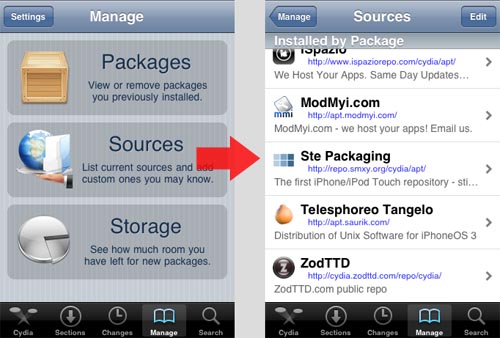
Now run Cydia and select Manage from the bottom menu. Touch Sources in the middle of the screen and a list of repositories will be displayed.
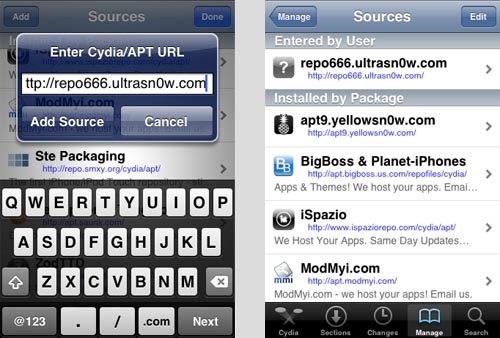
Touch Edit in the upper right hand corner and then touch Add. The URL for the ultrasn0w repository to add is repo666.ultrasn0w.com. Note that the "o" in ultrasn0w is a zero.
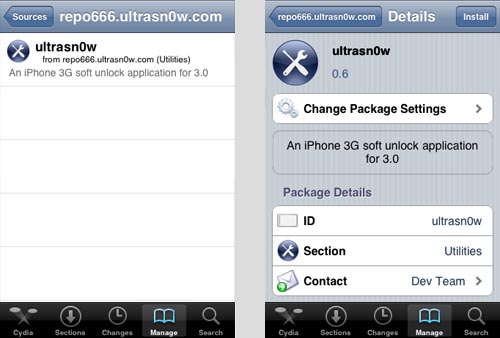
Select the ultrasn0w application. Touch Install to unlock your iPhone 3G.
Newest iPhone FAQs
Thanks to the iPhone Dev-Team for all of their hard work. Their updated utilities keep making our FAQs shorter and shorter.
Comments
Anonymous replied on Permalink
has anyone tried this?
Anonymous replied on Permalink
I have only tried the unlock software from the guys at www.unlockanyiphone.co.uk and it worked a treat on my iPhone 3G. They were so helpful to me when I had a few issues too. I would definitely recommend them.
Joel replied on Permalink
yes and it worked perfectly for my Iphone. Been looking 6 months for this stuff. thanks for those who worked so hard.
L replied on Permalink
Worked a treat. So easy. Thankyou.
Anonymous replied on Permalink
I have an iphone 3G 4.1 which I bought from someone. he said it was unlocked however cydia does not work on it nor does it recognize my sim card. I am trying to unlock it myself however it seems like redsnow is no longer working. Can someone please give me a step by step guide to get this phone functioning? I am a windows user. Thanks
Anonymous replied on Permalink
testing
gsmfastest.com replied on Permalink
iPhone Unlock Via iTune?
Please take backup of your iTunes before you start.
1. Please make sure that you are running the latest version of iTunes software on your computer. You can check it at http://www.apple.com/itunes/download
The next 2 steps are optional to unlock your iPhone, but these 2 steps will make sure that your iPhone is running the latest operating system software. If you do not have the original carrier SIM card or do not wish to update your firmware, please go to step 4.
2. If you've the SIM card from your original network (the network your iPhone is currently locked to), insert it. Connect your iPhone to your computer using the Dock Connector to USB cable provided with your iPhone.
iphone unlock via imei
iphone unlock via imei is very easy way to unlock iphone you can obtain your imei 06# and apply on gsmfastest.com to get your iphone unlock.
We calculate iphone unlock very fast than others iphone unlock stores
Anonymous replied on Permalink
Can you post to complete instructions? Thanks!
Anonymous replied on Permalink
thanks
SourceUnlock replied on Permalink
Official iPhone IMEI Factory unlock thruough iTunes for iPhone 5S, 5C, 5, 4S, 4, 3GS, 3G which is currently locked to worldwide networks. Also IMEI Factory unlocks which works with any iOS 4, 5, 6 or iOS 7 and baseband version, to work with any carrier worldwide like at&t usa, verizon usa, sprint usa, tmobile usa, o2 uk, vodafone uk, orange uk, ee uk, 3 hutchsion uk, tele2 sweden, telia sweden, telenor sweden, telenor norway, netcom norway, tele2 norway, telia norway, telia denmark, tele2 denmark, movistar spain, vodafone spain, orange spain, yoigo spain, claro brazil, oi brazil, vivo brazil, tim brazil, bell canada, rogers canada, telus canada, koodo canada, wind canada, mts canada, vodafone egypt, mobinil egypt, softbank japan, kt korea, sk korea, zain kuwait, zain bahrain, lusacell mexico, movistar mexico, telcel mexico, america movil mexico, a1 mobilkom austria, orange austria, hutchison austria, optus australia, virgin australia, virgin canada, virgin france, hutchsion australia, vodafone australia, telstra australia, sfr france, orange france, bouygues france, claro chile, entel chile, movistar chile, tmobile croatia, tmobile hungry, vip croatia, zain saudi arabia, stc saudi arabia, etisalat saudi arabia, etisalat dubai, mobitel bulgaria, lmt latvia, tmobile albania, comcel columbia, movistar colombia, tigo colombia, orange dominican republic, claro ecuador, movistar ecuador, emt estonia, telia sonera estonia, dna finland, telia sonera finland, orange (martinique) french west indies, tmobile germany, vodafone germany, o2 germany, vodafone ireland, o2 ireland, omitel lithuania, vodafone malta, voxtel moldova, orange moldova, tmobile montenegro, kpn netherlands, vodafone netherlands, tmobile netherlands, orange poland, play poland, orange romania, vodafone romania, si mobile slovenia, avea turkey, turkcell turkey, vodafone turkey, tmobile slovakia, claro uraguay, movistar uraguay, movistar venezuela, telifonica venezuela, www.sourceunlock.com
we must tell that if some problems happens and iPhone is not unocked we will refund your full payment – 100 percent guarantee.