How can I send a multimedia message (MMS) from the Apple iPhone?
Update: Apple iOS has fully integrated MMS support in the Messages app. The latest firmware also includes support for Apple's iMessage, which can be set up to send messages between iOS devices without using a text plan.
To send an MMS on the iPhone open the Messages app. Create a new message by tapping the button in the upper right hand corner of the screen. To add a photo or video touch the small camera button pictured in the screenshot below. You will be prompted to take a new photo/video or select multimedia content from an album on your device.
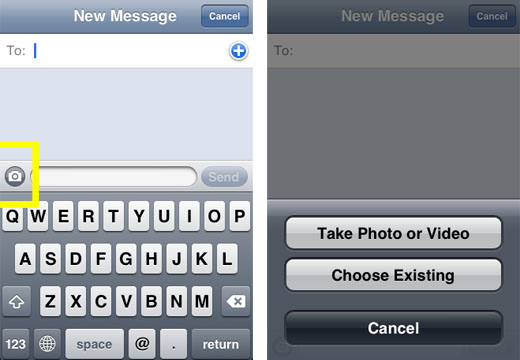
Previous instructions for sending MMS messages on older iPhones can be read below.
Update: Apple iPhone 3G and 3GS now support MMS on AT&T. To activate MMS on your iPhone 3G/3GS with firmware 3.0 follow these instructions. If you wish to update your firmware to 3.1 then MMS should activate during the update process.One of the most perplexing feature omissions from the iPhone was the lack of support for the MMS protocol. One can only assume that this was a deliberate choice by Apple, though it is hard to determine why.
Newest iPhone FAQs
Many users who are accustomed to snapping photos w/ their camera phones and sending those photos to friends and family via text/MMS messaging have been surprised to find out they can't do the same with their iPhone.
Thankfully, due to iPhone's email capabilities - there is a workaround.
In this day and age, almost all mobile phones have not only a phone number, but an email address. In fact, most mobile phones have two emails - one for plain text messages, and one for MMS.
Using iPhone's email picture function, you can still get your photos over to your friends' phones by emailing it to their phone. This does not require that the destination phone has email support. By emailing your picture to their phone and not their email, they'll receive it like a normal MMS message, provided they have MMS support on their phone.
Here's how to do it:
1) open a photo on your iPhone
2) click on the send photo link (bottom left hand icon)
3) select to email the photo
4) using the table below, enter the phone number of the person you want to send to, followed by the email suffix for their provider
| Service Provider | MMS Email Suffix |
| Verizon | vzwpix.com |
| AT&T/Cingular | mms.att.com |
| Sprint/Nextel | messaging.sprintpcs.com |
| T-Mobile | tmomail.net |
| Virgin | vmobl.net |
| Boost Mobile | myboostmobile.com |
| Alltel | message.alltel.com |
| Amp'd Mobile | vzwpix.com |
So, for instance, if you wanted to send an email to a Verizon user who's number was 8175551212, you'd send to 8175551212@vzwpix.com.
Hopefully, the iPhone will be updated to include MMS support soon. For now, this works.
Comments
Anders Batten replied on Permalink
This will do the trick, really. Slightly less convenient than MMS itself, but a very viable solution if you know what networks your friends use.
Gman replied on Permalink
What about Metro PCS?
Anonymous replied on Permalink
@mymetropcs.com
saul replied on Permalink
how about for optus, mms???
Anonymous replied on Permalink
What about Orange??
Ramhe replied on Permalink
Nice article. Also, you may send free SMS and MMS for free using web from website www.seasms.com
Anonymous replied on Permalink
I tried it ..send one to myself and then my sister in law who has alltel and she gets the text but not the image. I have At&T
Anonymous replied on Permalink
use (.net) instead of (.com) and it will work
#@mms.att.net
Anonymous replied on Permalink
Thank you...It works perfectly now :)
Susan replied on Permalink
This is kinda the opposite question. If someone tries to send an MMS picture to my Iphone...does it automatically go to email??? Or do they have to send it to my email initially???
Anonymous replied on Permalink
I had an Alltel plan that is owned by Verizon. But it is still Alltel. Alltel uses 2 seperate email addresses for SMS (TEXT) Messages & MMS (PIC) Messages.
The correct way to MMS an altell subscriber is like this:
252532xxxx@mms.alltel.net
(the phone number)@mms.alltel.net
For a plain SMS (text) is like this:
252532xxxx@message.alltel.com
(the phone number)@message.alltel.com
I know these to be correct because I still use these all the time.
iPad Mini Scree... replied on Permalink
I'm not sure why but this blog is loading incredibly slow for me.
Is anyone else having this problem or is it a issue on my
end? I'll check back later and see if the problem still exists.
Anonymous replied on Permalink
It didn't work for me!
Anonymous replied on Permalink
I am on the tesco network iphone 5 and had this problem the other day however as soon as i switched on mobile data the mms seemed to work but also you have to turn mms on in the settings menu go to general messages and mms on hope this helps alot of u
viox replied on Permalink
Worth pointing out to those not clued in to it - you can send pics to everyone's phone this way except iPhone owners.
Works great for everyone else though. :)
Hmmm... replied on Permalink
Does anyone know how the www.viewmymessage.com/1 works??!!
Anonymous replied on Permalink
thats the website you follow its a link an the username an password is riqht under neith it
Wyatt replied on Permalink
This trick also lets you send SMS/MMS messages to multiple recipients
Anonymous replied on Permalink
how?
Chad Shmukler replied on Permalink
By sending to multiple phone email addresses.
Anonymous replied on Permalink
You can already send SMS to multiple contacts. No need for a work around.
Anonymous replied on Permalink
i tried sending sms but the person told me that the message didnot reach there overseas country how can i do that so that message can be delivered.
Kevin replied on Permalink
I tried sending one and it didn't work.
Fartman replied on Permalink
I tried it as well and it didn't work. I got "550 SMTP connection refused . . . Action: failed Status: 5.2.0 . . . 550 SMTP connection refused." And it was a Verizon phone, just like in the example. Anyone have any idea why?
Matt replied on Permalink
The proper att address is **********@mms.att.NET from what I can tell. Thanks for the information! Very useful...
Calikites replied on Permalink
So when my friends send me photos is there any other way other than going to viewmymessage.com which i can't figure out how and the heck to do from the iphone anyway?
Jeff replied on Permalink
"I tried it as well and it didn’t work. I got “550 SMTP connection refused . . . Action: failed Status: 5.2.0 . . . 550 SMTP connection refused.†And it was a Verizon phone, just like in the example. Anyone have any idea why?"
I just tried it earlier (it was being discussed in another forum) and it worked fine. I have Verizon and I sent the picture to myself at myphonenumber@vzwpix.com with no problems...
jcha replied on Permalink
hello....does anyone know if different language keyboards can be forthcoming in updates?
Anonymous replied on Permalink
Go to Settings -> General -> International -> Keyboards
jcha replied on Permalink
If I want to send a picture from a non Iphone to an Iphone without the person with the Iphone having to go to some website, how can this be done, if even possible. How exactly can the person with the Iphone send pics from their phone to a non IPhone??
Pages