How can I send a multimedia message (MMS) from the Apple iPhone?
Update: Apple iOS has fully integrated MMS support in the Messages app. The latest firmware also includes support for Apple's iMessage, which can be set up to send messages between iOS devices without using a text plan.
To send an MMS on the iPhone open the Messages app. Create a new message by tapping the button in the upper right hand corner of the screen. To add a photo or video touch the small camera button pictured in the screenshot below. You will be prompted to take a new photo/video or select multimedia content from an album on your device.
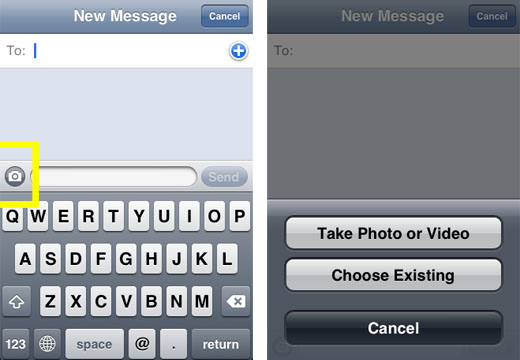
Previous instructions for sending MMS messages on older iPhones can be read below.
Update: Apple iPhone 3G and 3GS now support MMS on AT&T. To activate MMS on your iPhone 3G/3GS with firmware 3.0 follow these instructions. If you wish to update your firmware to 3.1 then MMS should activate during the update process.One of the most perplexing feature omissions from the iPhone was the lack of support for the MMS protocol. One can only assume that this was a deliberate choice by Apple, though it is hard to determine why.
Newest iPhone FAQs
Many users who are accustomed to snapping photos w/ their camera phones and sending those photos to friends and family via text/MMS messaging have been surprised to find out they can't do the same with their iPhone.
Thankfully, due to iPhone's email capabilities - there is a workaround.
In this day and age, almost all mobile phones have not only a phone number, but an email address. In fact, most mobile phones have two emails - one for plain text messages, and one for MMS.
Using iPhone's email picture function, you can still get your photos over to your friends' phones by emailing it to their phone. This does not require that the destination phone has email support. By emailing your picture to their phone and not their email, they'll receive it like a normal MMS message, provided they have MMS support on their phone.
Here's how to do it:
1) open a photo on your iPhone
2) click on the send photo link (bottom left hand icon)
3) select to email the photo
4) using the table below, enter the phone number of the person you want to send to, followed by the email suffix for their provider
| Service Provider | MMS Email Suffix |
| Verizon | vzwpix.com |
| AT&T/Cingular | mms.att.com |
| Sprint/Nextel | messaging.sprintpcs.com |
| T-Mobile | tmomail.net |
| Virgin | vmobl.net |
| Boost Mobile | myboostmobile.com |
| Alltel | message.alltel.com |
| Amp'd Mobile | vzwpix.com |
So, for instance, if you wanted to send an email to a Verizon user who's number was 8175551212, you'd send to 8175551212@vzwpix.com.
Hopefully, the iPhone will be updated to include MMS support soon. For now, this works.
Comments
Anonymous replied on Permalink
i cant do anything on the iphone mail thing can u help?
Ann replied on Permalink
I hope developer will develop an application in the iphone that can sent and receive mms.
Anonymous replied on Permalink
Find the files you are looking for at download-the-movie.net the most comprehensive source for free-to-try files downloads on the Web
Jenna replied on Permalink
what about a cricket wireless customer?
i have the iphone on at&t but my boyfriend has cricket. what would his prefix be?
Anonymous replied on Permalink
For criket, I think could be like the suffix after the @ on their e-mail address, try to find criket's e-mail address from their website and use all the suffix after the @, if it doesnt work, I dont know, but trying it wont hurt.
Anonymous replied on Permalink
Yeah, it actually works, i even found out that in order to send mms to people who owns a "tracfone" or prepaid cellphones, the suffix is NUMBER@mms.att.net, I dont know why, but it worked with AT&T, may be att owns tracfone too or something.
Anonymous replied on Permalink
BY THE WAY I MEANT prefix, sorry I'm not a native English speaker =).
pat-rice replied on Permalink
I tried using this for a verizon phone but i keep getting an error and the person i sent the pic to has not received it. Is there any help for this?? I was reading some of the comments and i saw that you have to set up a personal account?? What kind of personal account?? If there is anyone out there that can help me, please e-mail me @ pfortune29@yahoo.com. Thanks.
Anonymous replied on Permalink
i have a jailbroken iphone. i have also had this problem of sending pix to verizon users and they arnt recieving them. i recently found an application for my iphone that is a different camera interface, this interface allows me to chose picture size. after taking a new pic at 1/8th of iphones normal resolution and sending it to my bro he recieved it within 2 mins or less. but u need to setup an email account on your iphone. just go to gmail and sign up for a free one and set it up on your iphone, *BE SURE TO GO INTO YOUR SETTINGS ON YOUR NEW GMAIL ACCOUNT AND ENABLE POP, OTHERWISE YOUR PHONE WONT! CONNECT* please email me back if you guys get it working now or if u need more help, emal me at pmoiphone@gmail.com
Anonymous replied on Permalink
For AT&T/Cingular, the MMS email prefix is actually mms.att.net. I tried the .com prefix and it did not work.
Anonymous replied on Permalink
pktpix.com lets you send to any carrier (yes, international), but without having to know what carrier your friend is using or remember the domain name (which may or may not change).
you e-mail the picture to ##########@pktpix.com, and your friend gets a sms with a url to the picture.
http://pktpix.com
PKTPIX replied on Permalink
Hell yea this site works great I sent it from my PC to the IPhone and works perfect. Thanks for the tip.
Anonymous replied on Permalink
Verizon is vtext.com isn't it now?
Anonymous replied on Permalink
When sending to the vtext.com, my friend gets a message that there's a picture, but can't see the pic. I also have the refused email issue with my verizon friends.
Anonymous replied on Permalink
try taking out the subject, i did it both ways and when i had something in the subject line it didn't work
How Can You replied on Permalink
how can u send the pictures to a person with the Ntelos service
Gman replied on Permalink
Is there an MMS Email prefix for the service provider Metro PCS?
Vivian Fowler replied on Permalink
Similarly, is there any way I can receive an MMS sent to my iphone. My daughter has been sending me a picture and I am not receiving it....How will I know when the Iphone includes MMS support - or will this only be for new phones - next generation?
Anonymous replied on Permalink
I am having trouble recieving from an iphone too. I have a tmobile phone and keep getting picture msg retrieving failed. What should i do?
Help replied on Permalink
what about cricket cell phone users??
iphone secrets replied on Permalink
merci pour l'information et j ai deja ecrire comment faire dans l'un des mes poste
http://www.messiphone.com/mobile-secret/send-mms-iphone.html
Sariika replied on Permalink
What about for EUROPE? How do I know the provider of a certain phone?
SINISTER replied on Permalink
There is an APP called SwirlyMMS through a Jailbroken Iphone with Cydia.
I have the 16gb 3G white iphone and this software works like a charm. Love it!
Anonymous replied on Permalink
just can not get it to work sending a picture message or use my music as a ringtone or be able to just send a email help
Sarah replied on Permalink
This does not work...I tried to send a pic to an alltel customer, her phone is MMS capable, and all she got was text that said picture.jpg...no picture....is there another workaround??
bob replied on Permalink
I am a new iPhone user, A friend who uses verizon for his cell phone asked me to send a photo I had taken to his phone. I attempted to email a photo to his cell phone from my iPhone and discovered that it does not work using the formula listed in a previous post. = phone number + prefix etc. .com. This is an obvious shortcoming and a big disappointment.
Anonymous replied on Permalink
What if i want to send to someone on o2
please help
saul replied on Permalink
What is the e-mail prefix for optus and Telstra providers???
Thanx
Anonymous replied on Permalink
I just tried it with an iphone 3g to several att numbers, and every one of them got returned to me. Didn't work.
Tom P replied on Permalink
Chad,
The 'only' way you can send MMS messages from the iPhone is to an MMS supported device. There is NO workaround as of 1/1/09 that i see that will allow iPhone users to send MMS to another iPhone because the iPhone does NOT support MMS - I just tried it. In fact, my AT&T knowledge base confirmed it as well.
One can send MMS from the iPhone to 'other' phones with MMS capabilities, just not iPhones which is stupid. Why put in a 2 MP camera if you're not going to allow MMS. Not everyone has e-mail addresses.
Hope the developers at Apple take this dilemna into consideration and make it possible for all of us that HAVE purchased the iPhones v2.2.
Keep up the good information.
Tom P.
Pages