How do I exit safe mode on my jailbroken iPhone?
Noticed your iPhone status bar says "it Safe Mode" instead of the time? This means that SpringBoard crashed and extensions have been disabled. Touching the words Safe Mode in the status bar brings up the following dialog box, giving you three options on how to proceed.
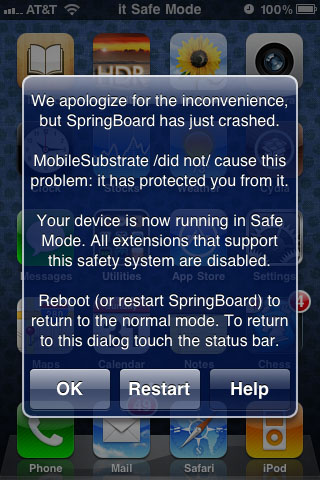
Here are the recommended steps to exit iPhone safe mode and return to normal operation:
1. Select Restart from the Safe Mode notification dialog. SpringBoard will restart and if the conditions that caused the crash have been resolved you are now in normal mode. Should this fail, try rebooting the iPhone by holding the sleep button and sliding to power off.
2. If step one still leads to Safe Mode, it's possible that a recently installed Cydia package such as an extension or tweak is causing the problem. While in Safe Mode, use Cydia to uninstall the suspected extensions or tweaks. Restart SpringBoard.3. Still in Safe Mode? Search for and install the app Crash Reporter from Cydia. Open the Crash Reporter app and select SpringBoard. If crashes are found, the first one could be the problem. Follow step two to remove the offending package using Cydia. If restarting SpringBoard or rebooting the iPhone continues to result in Safe Mode, move to step four.
Newest iPhone FAQs
4. Restore your iPhone. Make sure not to upgrade your firmware to a version that can't be jailbroken. iTunes will want to update your iPhone operating system to the latest version by default. Follow these instructions to use redsn0w to jailbreak a specific firmware version. If your SHSH hashes are saved, you can downgrade or install a specific version of firmware then jailbreak.
Comments
Lucky Duke replied on Permalink
Great Tutorial, thanks. Step 3 saved me from loosing my Jailbreak...
Anonymous replied on Permalink
LOSING, not loosing.
Oliver J R Cooper replied on Permalink
Just now I got error while updating my iPhone 4 to iOS 7, and it stucks in the DFU mode. But I found the solution after I installed TinyUmbrella.
1. Disconnect your phone from iTunes
2. Turn Off your phone
3. Install TinyUmbrella ( http://bit.do/exit-safe-mode-on-iPhone )
4. Connect your phone again
5. Click "Exit Recovery" at the top right of TinyUmbrella apps.
6. Done.
Your phone will restart then it returns to normal mode again. Hope it helps!
David Montero replied on Permalink
I had a similar experience. To resolve it I restored the phone back to IOS6 from iTunes, then installed the GM of IOS7. Once I did this, the phone saw my iCloud backup from yesterday morning and restored everything.
Not sure if it was the best route, but it worked for me. If it fails on the first try just follow the steps.
http://gg.gg/2zqey
Anonymous replied on Permalink
Easier way. Do a hard restart (hold power and home buttons til restart), then hold the volume up button. This will disable your extensions/tweaks and allow you to access Cydia to remove whatever tweaks are crashing you. Cheers.
Anonymous replied on Permalink
This is AWESOME ADVISE MAN !!!! Thank you !!!!!!!! 2 hours of searching in google how to start iphone and restore from Safe Mode ;)))
Anonymous replied on Permalink
You saved my life buddy!!!
Thanks, it totally worked, nothing else!!
Anonymous replied on Permalink
i know this is way late but i did this and now i don't know how to get it back to the jailbroken version.
juida replied on Permalink
my name is jurida,im from albania and i just want to say I LOVE YOU! You saved me ! oh my god! 7 hours with this f.. iphone
Hina replied on Permalink
Hey thanks for giving great advice I had tried many times in different ways but I couldn't Able to solved when I try the way u said its work out :)
Anonymous replied on Permalink
thank you thank you thank you not bullshit this works
joeybologna replied on Permalink
HOLY SHIT THANK YOU SO MUCH
Anonymous replied on Permalink
FÜCKING HELL YOU SAVED MY LIFE
Anonymous replied on Permalink
THANK YOU SO MUCH. Best advice ever.
Anonymous replied on Permalink
Saved my phone thanks
Anonymous replied on Permalink
Thank you. The crash reporter totally worked.
Anonymous replied on Permalink
THANKS ALOT FOR THE HELP MAN
Anonymous replied on Permalink
Thanks
The Crash reporter did his job perfect.
ADI replied on Permalink
step three worked for me aswell!! cool appthi crash reporter!! thank you for tutorial!!
Anonymous replied on Permalink
The best tutorial I have ever used. You have saved lives my friend.
Anonymous replied on Permalink
When i tried the fourth step the phone just stops. I can't get it to dissapear. The exit the safe mode thingy thing is still there and if I try to remove everything from my phone, and also the jailbreak, it starts but suddenly it just stops and you will just have to leave it there until it runs out of battery. So freaking annoying, what the hell am I supposed to do? I know, GG on that one but still.
Samuel replied on Permalink
Hi, When my iPod's SpringBoard crashed, it didn't say safe mode instead of the time, so I went and used my respring short cut to respring, but it went straight back into safe mode and continues to do this. Do you know a way of getting out of this "Permanent Safe Mode"???
It's getting annoying now because I cannot use anything from cydia and can not continue testing my packages from my cydia repo.
Anonymous replied on Permalink
Great Job Thank you very much.
Asdf replied on Permalink
Great job awesome find
dino replied on Permalink
tnx man i use to have dreambord i uninstaled and it woks tnx a lot :))
BonjiBee replied on Permalink
The Crash Reporter worked like a charm. Wikid thanks!! Been racking my brains and eating up time looking all over for solutions to this one.
Anonymous replied on Permalink
thanks alot my iphone now off of safe mode
shahroz replied on Permalink
hey guys i had the same problem but nothing worked for me. i instaled a update in cydia in safe mode just a regular one but it upgraded most of the apps.after that i was going through my packages when i saw "Substrate safe mode" i disabled it and it respringed now its is out of safe mode. hope it could be of some help
Anonymous replied on Permalink
This is how I saved myself so much trouble. Let the battery die down and restart it by plugging it into the wall. That was the only thing that saved me. I was locked out of my jailbroken phone but the passcode screen wouldn't show up. Glad I didn't restore and loose my phone numbers, pictures etc
Anonymous replied on Permalink
thanks the second one did it for me. i was trying to download a free version of grid lock. what an awful little fuck that one
Pages