How to fix Gmail incorrect password/user name error on iPhone?
Sometimes the iPhone mail app will intermittently stop getting Gmail and the dialog box below will appear. The message "The user name or password for imap.gmail.com is incorrect" can show up even if you have made no changes to your Gmail account settings on the iPhone.
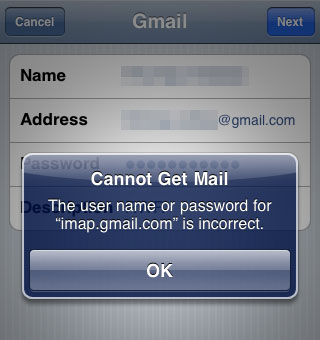
Here are instructions on how to fix this problem should it occur on your device:
1. Quit all mail clients that are accessing the affected Gmail account. This means the Mail app on the iPhone and any other place you are accessing your Gmail from such as a computer.
2. Open Safari on the affected iPhone and navigate to this page: http://www.google.com/accounts/DisplayUnlockCaptcha3. Enter your full Gmail address, password and type the characters you see in the picture. Touch the unlock button to verify your account.
Newest iPhone FAQs
4. Open the Mail app and your Gmail access should be restored.
Comments
Anonymous replied on Permalink
Thanks a bunch!
Anonymous replied on Permalink
Ok everyone. After trying various "fixes" that didn't work, this is what worked for me: on your phone, delete your Gmail account. I also turned off my pc browser. Then , add the Gmail account back on the phone. Worked for me.
Anonymous replied on Permalink
Tried that - didn't work for me.
Anonymous replied on Permalink
Different solution :
This did not fix my problem, but reading about the 2-step verification issue I tried to delete the 2-step verification on my gmail account on my laptop. I came across this warning before I turned off the 2-step verification:
https://support.google.com/accounts/answer/185833?hl=en. Problem fixed.
Anonymous replied on Permalink
this solved my problem, thanks
Anonymous replied on Permalink
I went to turn off the 2-step verification and it told me to try the app password generator. There is a link to it when go to turn off 2 step and it worked great.
Chuck replied on Permalink
This worked for my iPhone 6
Kimbra replied on Permalink
Hallelujah!
กรุป่ายาง replied on Permalink
It's very straightforward to find out any topic on net as compared
to books, as I found this article at this web site.
Anonymous replied on Permalink
thank u so muchhhhhh!!!! :)
cityinsider.com replied on Permalink
This is actually a good feature to have as with Ms - Config you can only enable or
disable a startup item, but don't have the option to Modify
an entry option. Since office buildings are many feet high they need some expert staff and required material and tools in order to execute the cleansing process.
Warm water is not necessary but it can make things a bit more pleasant.
Anonymous replied on Permalink
Thank you. This worked.
Anonymous replied on Permalink
Thank you!
Anonymous replied on Permalink
Thank you for sharing. This finally fixed the problem for me.
Kristin replied on Permalink
This fixed it for me too!
Anonymous replied on Permalink
This worked!! It was because of the 2 step verification that messes it up. Follow these steps and it will solve the problem.
Anonymous replied on Permalink
Thanks, this worked great! I had to create a new password and that worked immediately.
Anonymous replied on Permalink
Boom! Thank you.
apex t review replied on Permalink
I'm extremely inspired together with your writing talents and also with the structure in your blog.
Is that this a paid theme or did you customize it yourself?
Either way stay up the excellent high quality writing, it is rare to see a nice weblog like this one nowadays..
Boise Wedding P... replied on Permalink
Wonderful article! That is the type of info that are supposed to be shared around the internet.
Shame on the seek engines for now not positioning this publish higher!
Come on over and consult with my website . Thank you =)
Shawn replied on Permalink
Generating an application specific password worked. Following the above, when I tried to turn off my 2-step verification, it prompted me to generate an device password, which I did, entered it and now it is working. Thanks!
perfect garcini... replied on Permalink
Please let me know if you're looking for a author for your site.
You have some really great articles and I feel I would be a good asset.
If you ever want to take some of the load off, I'd really like
to write some articles for your blog in exchange for a link back to mine.
Please blast me an email if interested. Kudos!
Greg. Soiseth replied on Permalink
I need your guises help with my face book
Anonymous replied on Permalink
Fixed mine! Thanks for posting.
Anonymous replied on Permalink
yup, turning off 2-step worked for me too on iphone6
ro replied on Permalink
this worked perfectly so easy thank you!!
farina replied on Permalink
this solution works for me. thanks a lot!!
Anonymous replied on Permalink
Worked like a charm! Thanks!
Vusal replied on Permalink
Thanks a lot. Finally it works.
Mark D' Almeida replied on Permalink
You saved my time, effort and struggle. Problem fixed after removing 2 step verification
Pages