iBooks

Department of Justice to Sue Apple Over Fixed eBook Prices

UPDATE: The U.S. has officially filed an antitrust lawsuit against Apple as well as publishers Hachette SA, HarperCollins, Macmillan, Penguin and Simon & Schuster. - via Bloomberg

UPDATE 2: The Department of Justice has released a PDF of their complaint. It's a really interesting read!

The Department of Justice plans to launch an antitrust lawsuit against Apple and five major publishers for alleged price-fixing. In March the The Wall Street Journal reported that the U.S. Justice Department warned Apple and the publishers that it planned to sue them for raising the price of electronic books. The Justice Department believes that Apple violated federal antitrust laws by jointly raising the prices with the five publishers.

Apple iPad iBooks

"The Justice Department is investigating alleged price-fixing by Apple and five major publishers: CBS Corp’s Simon & Schuster Inc, HarperCollins Publishers Inc, Lagardere SCA’s Hachette Book Group, Pearson and Macmillan, a unit of Verlagsgruppe Georg von Holtzbrinck GmbH. A lawsuit against Apple, one of the parties not in negotiations with the Justice Department for a potential settlement, could come as early as Wednesday but no final decision has been made, the people said."

Combine iPhone Newsstand and iBooks with Booksstand

iPhone users seem to fall into two camps, those who use Newsstand and others who can't stand it and want to delete or hide the Newsstand icon in a folder. The jailbreak tweak known as Booksstand may help those in the first group, however iPhone owners with no use for Newsstand won't be converted.

Booksstand iPhone tweak jailbreak

What Booksstand does is consolidate your iBooks and Newsstand content into one place, putting shortcuts to your iBooks content in the Newsstand. When you select a book from the Newsstand, this triggers iBooks to open and the content to be displayed.

iBooks Jailbreak Problems Fixed: Corona 5.0.1 Untether Updated

The Corona 5.0.1 Untether package has received another update, this time to correct an iBooks problem where images failed to display or displayed incorrectly after installation. Chronic Dev Team released Corona 5.0.1 Untether to free tethered jailbroken devices including the iPhone 4 from the need to reboot with a computer.

Apple iBooks iOS logo icon

After installing early releases of both Corona and the redsn0w jailbreak for iPhone 4 and 3GS devices, some users had problems with iBooks including a Configuration Error dialog. The latest version of Corona (1.0-7) should fix both iBooks errors and can be installed directly from Cydia on a jailbroken device.

How to Fix iBooks Error After iOS 5.0.1 Jailbreak

UPDATE: iPhone developer pod2g blogged that an upcoming Corona update will fix "iBooks and other softwares having sandbox issues." We will let you know when it's released.

When jailbreaking iOS there are sometimes caveats and unintended consequences, although normally for enthusiasts the advantages of running new software take precedence. iBooks fans might have found that after liberating their device with the latest redsn0w untethered iOS 5.0.1 jailbreak that iBooks ceases to work.

iOS 5.0.1 jailbreak iBooks error

Now there's a package available in Cydia that should fix the problem. Some users have reported no luck with the fix, but our team was able to fix iBooks using the procedure below. As always, jailbreaking and installing non-Apple packages is performed on your iPhone at your own risk! Here are instructions to fix iBooks after jailbreaking.

Apple iBooks App Gets Major Update

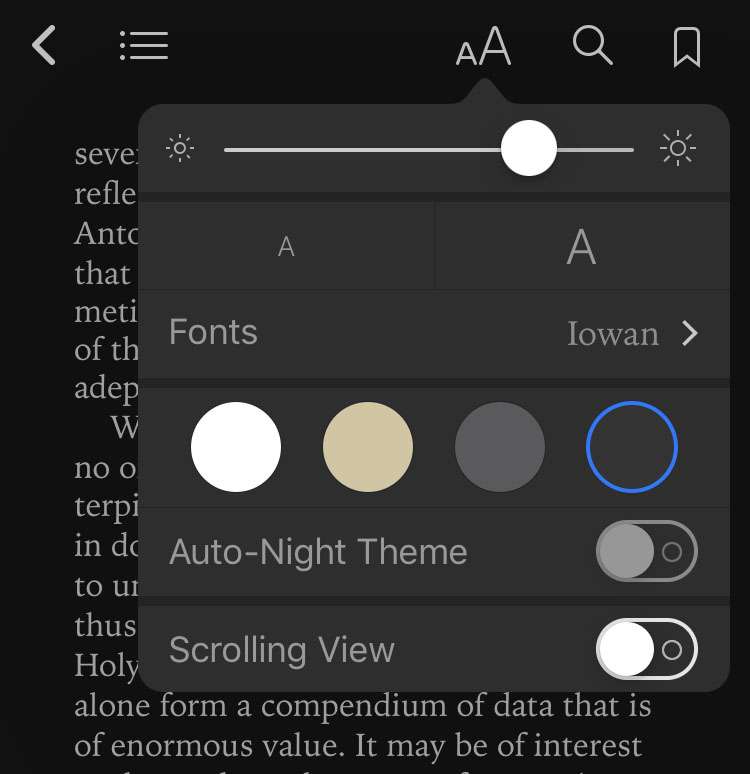
Apple's universal reader app for iPhone, iPad and iPod touch has just been updated to version 1.5. The new iBooks adds several new features including a nighttime reading theme to ease eye strain when reading in a dark room. Some studies have shown that viewing LCD screens before bedtime can keep some people from falling asleep quickly. Maybe the new iBooks will help.

Apple iBooks iOS logo icon

Apple has also added several new fonts including Athelas, Charter, Iowa, and Seravek for your reading pleasure. For those who may have been irritated by the book-like graphics that take screen real estate away from the text, Apple has added a full-screen mode to remove distractions.

Syndicate content