MobileSafari

Make Google Chrome and Third Party iOS Apps Faster by Giving them a Nitrous Boost

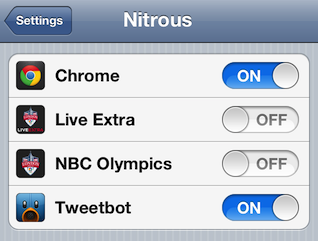
If you prefer Google Chrome (or any other browser) over Safari but use Safari because it's faster, I have the perfect jailbreak tweak for you. iPhone users can now give Chrome and other third party apps a speed boost with a new jailbreak tweak called Nitrous.

Jailbreak Tweak

Safari is faster than other mobile browsers on the iPhone because Apple restricts access to the fast Nitro Javascript engine in iOS. Nitrous levels the playing field by unlocking the Javascript block for third party apps. This allows browsers like Chrome and apps like Tweetbot to perform much better.

SearchEnable: Add Alternative Search Engines to Safari

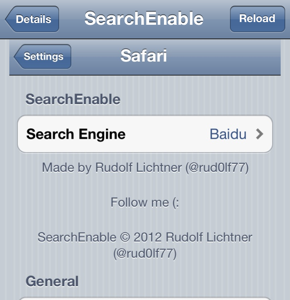
SearchEnable is a new jailbreak tweak that allows you to add alternative search engines to Safari. The tweak adds Ask, Baidu, blekko, Sogu, Volunia, Yandex, Evi and WolframAplha to the Safari search engine options listed under Settings. SearchEnable basically gives you a few more international choices besides the popular U.S. options (Google, Yahoo and Bing) already included on your phone. Make sure you have the Safari app enabled under SBSettings or the Safari setting panel will not be available.

Jailbreak Tweaks

How can I open Safari links in the background on my iPhone?

Safari doesn't have any browsing tabs (yet) as most people are used to on desktop computers. Until Apple adds this feature to iOS, Mobile Safari simply opens a new page when touching a link. If you don't want your reading interrupted on the iPhone or iPad, there's a way to stop this from happening.

To make the link open in the background so you can check out the page later, you have to change an option in the main settings. Navigate to Settings -> Safari -> Open Links -> In Background.

Analyst Report: Google Chrome Browser for iOS Coming This Year

Google wants to keep 100% of its mobile search revenue, and plans to do so by releasing Google Chrome for iOS devices before the end of the year, according to Macquarie analyst Ben Schacter.

Schacter writes: "Apple may already be reviewing Google’s submitted code for a Chrome browser for iOS."

It's unknown whether Apple will approve or reject the Chrome browser, but Schacter claims we can expect it sometime this year.

iPhone Browsers

"Schacter says we can expect a Chrome browser for iOS as soon as Q2, but if not this quarter, then definitely this year."

According to Business Insider, Google must share an estimated 50%-60% of its search revenue with Apple. If Google cuts out Apple's Safari browser they will then get to keep 100% of their revenue.

How can I change my iPhone default browser?

iOS on both the iPhone and iPad offers no ability to specify one of the many Mobile Safari alternatives as your device's default browser.

Owners that have jailbroken their iPhone can add this functionality by installing an iOS tweak called Browser Changer, which is the successor to OpenOpera. There's also an SBSettings toggle available for Browser Changer, allowing for quick and easy default browser changes.

Browser Changer comes with support for over 25 alternative browsers, including popular alternatives to Mobile Safari such as Dolphin, Atomic Browser, Opera Mini and more.

How can I upload files / images with Safari on the iPhone?

You may have noticed when you try to upload a photo or file using the Mobile Safari web browser on the iPhone the feature is disabled. Apple limits this functionality on your device by default. If your iPhone is jailbroken you can enable Safari file uploading with the following tweak:

1. Open Cydia and navigate to Sections -> Tweaks -> Safari Upload Enabler.
2. Touch the Purchase button in the upper right hand corner.
3. Login to the Cydia Store and pay $1.99 with PayPal or Amazon Payments.
4. Touch the Install button then press Confirm.

How do I use the Safari "find text" feature in iOS 4.2?

Many of you who eagerly updated to iOS 4.2 have inquired how to take advantage of the new feature that allows you to search for and find text within webpages in the iPhone's Mobile Safari browser.

Have no fear, the feature is there, even if you can't find it.

How can I clear the iPhone Safari web browser cache?

To reload a page in Mobile Safari from a remote server or clear up space on your iPhone you may want to clear the browser cache. Files are automatically stored in the browser cache just like they are on the desktop version of Safari and in other web browsers. This helps to speed up web page loading on sites you have already visited.

To clear the Safari cache:

1. Navigate to Settings -> Safari
2. Scroll down and touch Clear Cache.
3. Tap the Clear Cache button.

Your Safari browser history and cookies can also be cleared using the same settings menu.

Microsoft Bing Search Coming to iPhone 4?

Rumors have resurfaced of ongoing negotiations between Microsoft and Apple involving the addition of Bing to the next generation iPhone. iPhone OS 4.0 could see Bing as an option next to Google and Yahoo if the talks are successful.

apple iphone microsoft bing

Initial reports from TechCrunch claimed that a deal was in place, however now it sounds like this is not the case. In January, Business Week reported that Apple could replace Google with Bing as the default search engine. According to TechCrunch, the purpose of these latest discussions is not to replace Google.

How can I create bookmark folders in Safari on the iPhone?

Did you know you can create folders in Mobile Safari to organize bookmarks? This feature is hidden in Safari on the iPhone, but here's the procedure:

1. In Safari, choose the Bookmarks button (this icon looks like the outline of a book at the bottom of the screen).

2. Touch Edit on the lower left.

3. The New Folder button will appear on the bottom right.

4. Enter the title of the new folder to create and choose the folder to put the new folder in.

5. Touch Done and touch Done a second time. The new folder will appear in the list of bookmarks.

Syndicate content