Submitted by Bob Bhatnagar on
UPDATE: iPhone developer pod2g blogged that an upcoming Corona update will fix "iBooks and other softwares having sandbox issues." We will let you know when it's released.
When jailbreaking iOS there are sometimes caveats and unintended consequences, although normally for enthusiasts the advantages of running new software take precedence. iBooks fans might have found that after liberating their device with the latest redsn0w untethered iOS 5.0.1 jailbreak that iBooks ceases to work.
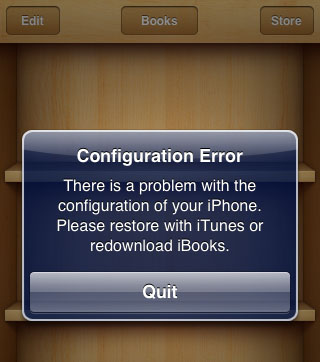
Now there's a package available in Cydia that should fix the problem. Some users have reported no luck with the fix, but our team was able to fix iBooks using the procedure below. As always, jailbreaking and installing non-Apple packages is performed on your iPhone at your own risk! Here are instructions to fix iBooks after jailbreaking.
1. Make sure you've jailbroken iOS 5.0.1 untethered with redsn0w or Corona
2. Open Cydia and navigate to Manage -> Sources
3. Tap the Edit button then tap the Add button
4. Enter the repository address repo.insanelyi.com and touch Add Source

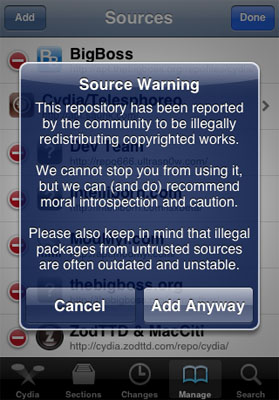
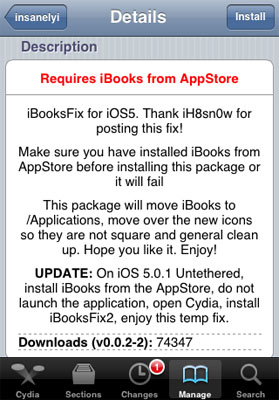
6. After the repository installs, use the Search function to find a package named iBooksFix2
7. Touch the Install button then tap Confirm
Newest iPhone FAQs
8. iBooksFix2 will install and move iBooks files to fix the configuration error
9. Touch the Restart Springboard button
10. Reboot your iPhone
11. iBooks should now be working normally again
Comments
eky replied on Permalink
hi,
i followed every step...but still it doesnt work.....ibooks closes within 2-3sec..... any suggestion ???
Anonymous replied on Permalink
Exact same thing happens to me. Open, closes within seconds. The "configuration error" message is gone, though.
DTHCND replied on Permalink
Before doing the steps above, delete iBooks and then reinstall iBooks. This time, do NOT open it! Do the above steps, and ta-da!
eky replied on Permalink
tried it for 3-4 times .... problem remains the same :( ... its really getting my nerves :@
Anonymous replied on Permalink
hi. I also faced the same problem with you guys until i did the following.
I followed every instruction given.
delete the ibooks and redownload fresh from app store.remove the ibookfix, ibookfix2.
Once you have finish downloading a fresh copy of ibook, DO NOT OPEN THE IBOOK
install ibook fix 2. make sure no errors when installing ibookfix2.
respring
then reboot (this is the part that i got it wrong the first place) reboot is NOT pressing down the sleep button and slide to turn off..
you have to press both home and sleep button at the same time until you see an apple logo.
once it is rebooted, the ibook will work again.
Good luck.
Anonymous replied on Permalink
YEAHH!!
3GS IOS 5.0.1 unthered redsn0w
IT WORKS FINE!!
press both home and sleep button at the same time until you see an apple logo
WAIT. TAKE 3 MINUTES!
then sync. with itunes and all books are here.
Abs replied on Permalink
How do I delete the ibooks app from my IP4? there is no x button
Khateeb Zaheer Ahmed replied on Permalink
Pls help me in deleting iBooks app as it has stopped working and I'm not able to open it and also tel me as how to re install
Thanks
Anonymous replied on Permalink
Thanks for explaining the "KEY" to this fix. I did exactly what DTHCND instructed
deleted iBooks, reinstalled (DID NOT OPEN), reinstalled the iBooks fix, then rebooted my phone (NOT RESPRING) and ta-da!
Gerry replied on Permalink
I wanna asking about 'update for iBooks'
so, if we already installed 'iBooksFix2' and then, there's an update for iBooks(from App Store), what should we do? remove the 'iBooksFix2' and then update the iBooks from App Store, or just update the iBooks without removing the iBooksFix2?
thanks a lot :)
Anonymous replied on Permalink
Download iBook fix from Xsellize, then SBSetting, in the setting scroll down and in system wide options, go to system options, and fix on top, then iBooks works!
haider replied on Permalink
hey dude just delete IBOOK from ur cell
dont install anything
like ibook fix 2 or something
if u have then uninstall it
then go to intallous. download ibook the cracked version
you ll have ur ibook
coz for me it worked
trust me
Anonymous replied on Permalink
Exactlay same with me just disaapears after 2 seconds and i cannot sync books with itunes
yafi replied on Permalink
Not working
Anonymous replied on Permalink
i followed every steps....and it works for me :)
iPod touch 4 with ios 5.0.1 (untethered)
Anonymous replied on Permalink
Absolutely does not work.
Did everything listed. I even did a restore and fresh jailbreak of redsnow b3 and made sure not to open iBooks and it still doesn't work. To make matters worse, you get and iBooks app icon that can NOT be deleted. Furthermore, when I go into the App Store to try and isntall iBooks to try again, it installs, but then I go back into the App Store and it is listed as not installed. Do it again, the same thing. Can't delete the native iBooks app that the iBooks Fix 2 creates, and I can't install iBooks from the app store or iTunes.
The only way I was able to fix this was to download the iBooks Fix for iOS 5 from the xsellize repo. That didn't fix iBooks either, but at least after I uninstalled it, it fixed what the iBooks Fix 2 tweak did, and I was able to get rid of that undelete-able iBooks native app that the tweak made.
Need a proper fix. I read A LOT. Appreciate the jailbreakers and their efforts. Just frustrated.
Anonymous replied on Permalink
I am experiencing exactly the same thing you are describing. Thanks for letting me know how to remove the "undeletable" ibooks app. Strange that nobody has been able to come up with a fix for this.
Anti-Life replied on Permalink
SAme problem here... Ended up with 2 undeletable iBooks had to download the http://cydia.xsellize.com/ iBooks fix to delete them. I hope this gets fixed soon, I'm gonna try one more time, then move on to another solution somewhere else. I have been searching for solutions on almost every jailbreaking site. Its starting to get annoying.
Anti-Life replied on Permalink
Last attempt failed. I had removed all previous fixes, downloaded iTunes from apple again (did not open it) and tried repo's fix again, restarted springboard, rebooted iPhone, and this time the iBooks icon is missing entirely. Would anybody have any idea why this has happened, or if I have done anything wrong. Thanks in advance
John replied on Permalink
The same thing has happened to me and it really blows! Have u found any news on the subject
Anonymous replied on Permalink
Hey i just find out how to get ibooks to work on iphone4 5.0.1 unthetered with redsnow
very simple : get rid off the original ibook.app (you dont need the original ibooks.app)
install iBooks Fix for iOS5 from Xsellize , install or use your existing sbsettings from cydia and run Fix User Dir Permissions, respring und you have working iBooks again!
Anonymous replied on Permalink
Thx. This fixed my issue.
stevenrbjc replied on Permalink
Thanks! worked!
Milen replied on Permalink
Thanks! Thanks! - worked!
quen replied on Permalink
ibooks fix ok (use Fix User Dir Permission from sbsetting). Thanks
But the facebook can not access. Anybody have the same my problem?
Anonymous replied on Permalink
Thank You so much this solution! Iphone just wasn't the same without ibooks. Worked perfectly!
Dina replied on Permalink
It works on iPhone 3gs too! thanks a lot dude! have been frustrated with this problem ever since I updated to ios 5 and jailbroke it
TArIq replied on Permalink
Thanks alot
it works with me
Anonymous replied on Permalink
ya same problem here but did remove ibook icon. i just removed the ibookfix then reinstalled ibook even it still getting error on instalation but the cross on icon apear
kuxer replied on Permalink
Cool i just did the same and i was able to dlelete the ibooks app the bad thing its the othter apps like beyondprint reader need an special account and u cant only drad and drop to opened
Pages