mSpot Launches iPhone Streaming Movie Rentals

Looks like mSpot has beaten Netflix to the punch. mSpot Mobile Movies will stream movie rentals to your iPhone or any of 30 compatible mobile devices. The movies are delivered over Wi-Fi or 3G connections on demand.
iphone streaming movie rental mspot

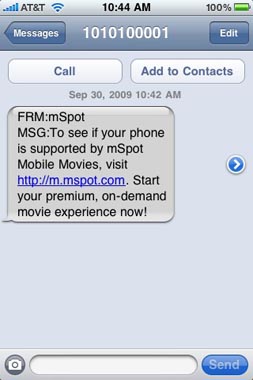
To test your mobile device for compatibility, mSpot sends a text message with a link to the service (iPhone users can enter the URL directly into Safari). Movie Club members can purchase credits that expire at the end of the month if unused. A more expensive option is a one-time rental of $4.99. The movie can be watched for 24-48 hours depending on the film.

Unbelievable iPhone App Store Statistics

The App Store has only been online for five quarters, yet it continues to impress with a staggering number of offerings and purchases. Apple has announced there are now 85,000 iPhone and iPod Touch applications available via iTunes.

50 million people own a compatible Apple device and 125,000 software developers are participating in the Apple iPhone Developer Program. 1.5 billion individual downloads were clocked on the App Store within the first year of its operation.

MMS Tips on the iPhone 3G and 3GS

There are several things included in the iPhone 3.0 MMS release that users may not be aware of until they start flexing the application. The key here is that you can send much more than photos. Information from your Contacts can be sent via MMS by touching the Share Contact button when viewing entry details.

Similarly, touching the share button in Voice Memos will give the option to send via MMS or email. The iPhone 3GS will send video using MMS, although it will severely degrade the size and quality. This helps to insure the video will play on smaller and older phones.

Stop Accelerometer Rotation When Viewing iPhone Photos

Some iPhone applications have preferences to set an accelerometer lock, which keeps the orientation of the app in one direction no matter which way the iPhone turns. Unfortunately, most commonly used apps do not have this feature.

Rotation can be switched off when viewing photos on the iPhone Camera Roll or Photo Library. When viewing a photo, hold down with one finger on the photo as if you're trying to copy the image.

How can I fix my iPhone MMS send failed error on AT&T?

You are getting the notorious exclamation point when you try to send an MMS on your iPhone 3G or 3GS. There are a few steps you can try to fix the problem before you contact Apple or AT&T and they give you the same advice.

iphone att mms failure

First check your AT&T Wireless account and make sure you have an active iPhone text plan. You can check this online and you should see a 200, 1500 or unlimited messaging plan on your account.

tags: 

Pages

Subscribe to The iPhone FAQ RSS