News

DNDPro Brings More Control to iOS Do Not Disturb

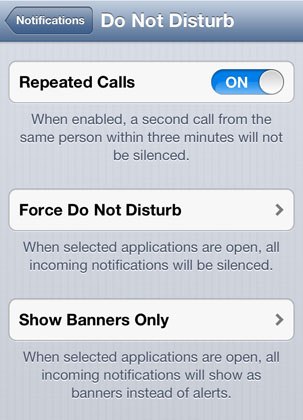
Frequent Do Not Disturb users might be wondering how they can gain more control over the feature. Luckily for those running iOS 6.1.2 or earlier the DNDPro jailbreak tweak does the trick. Installing this free package will add two new options to the stock Do Not Disturb settings. These same items will also appear in their own location under Settings -> DND Pro.

DNDPro tweak Cydia iOS

DNDPro revolves around enabling Do Not Disturb mode while using specific apps. This means that notifications can be turned off automatically while an application is in use on the device. Closing the app will turn Do Not Disturb mode off again, resuming normal alerts and phone calls.

Add Quick Settings Shortcuts to iOS With MultiShortcut

When it comes to quickly accessing iOS Settings, there are many options available on a jailbroken device. Toggles and other shortcuts can make burrowing through multiple Settings menus to change one item a thing of the past. MultiShortcut adds another free option for those looking to change settings in a flash.

MultiShortcut tweak Cydia iOS

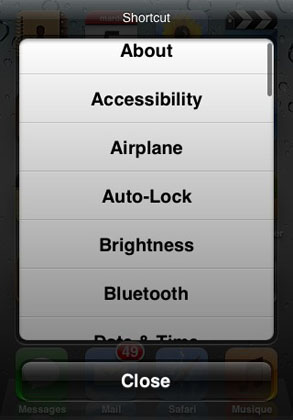
Once installed, MultiShortcut adds 32 instant shortcuts right to the iOS home screen. How is this accomplished? Touch and hold the Settings icon and the list of shortcuts appears. Scroll to the desired item and select to instantly access this portion of Settings. There's also a Close button to dismiss the menu and skip entering Settings if needed.

AlarmControl Toggles iOS Alarms In One Swoop

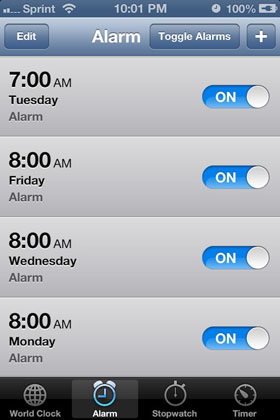
Does your jailbroken iPhone have a long list of alarms set up in the Clock app? Sometimes things can get disorganized, with some alarms on and others off. Scrolling through this list is easy enough, but the AlarmControl tweak makes things even easier. All alarms can be toggled immediately with just one button at the top of the screen.

AlarmControl tweak Cydia iOS

Once installed, AlarmControl will add this Toggle Alarms button to the Clock app, right next to the add new alarm (+) button. Tap the toggle once, and all alarms are off. Tap it again, and every alarm will be turned on, it's that simple. Imagine going on vacation and touching a single button to keep your iOS alarm clock silent for the entire trip.

Hide iOS Lock Screen Notifications With MultiLS

Despite the high iOS 7 adoption rate, developers are still working on new and useful tweaks for those with older, jailbroken devices. With an iPhone 5 or earlier running iOS 6.1.2 there are many options available on Cydia. Many of these tweaks simulate iOS 7 features, and others such as MultiLS add new functionality to iOS.

MultiLS tweak Cydia iOS

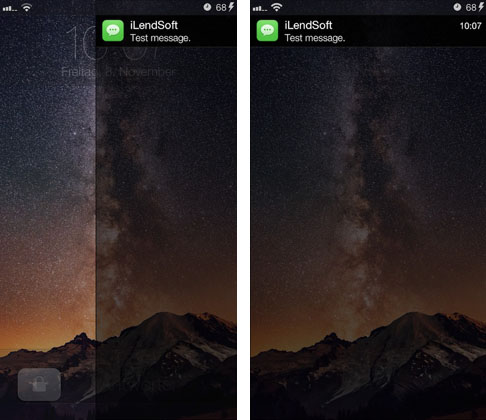
Essentially, MultiLS adds a second lock screen to iOS. Incoming lock screen notifications are stored on a separate lock screen, hidden from view. Instead of popping up immediately, when a new message or alert arrives a slick glowing bar appears on the right side of the lock screen. The text in the slider bar also changes from "slide to unlock" to "slide to view".

Save Up To $125 on Apple's 13-inch MacBook Air [Deals]

B&H has dropped the price of Apple's 13-inch MacBook Air to $974.95. The 128GB MacBook Air is normally $1,099 through Apple.com or at Apple retail locations. The thin and lightweight notebook is powered by a 1.3GHz dual-core Intel Core i5 processor, 4GB of onboard RAM, and it features a native resolution of 1440 x 900.

13-inch MacBook Air Deal

The MacBook Air is equipped with a full-size backlit keyboard, multi-touch trackpad, a FaceTime HD webcam and built-in stereo speakers. It also features dual-band 802.11ac Wi-Fi, Bluetooth 4.0, two USB ports, one Thunderbolt port and a SDXC card slot.

Pages

Subscribe to RSS - News