Easy Tips to Speed Up Your iPhone or iPad

Has your iOS device been running slower lately? There are a few simple things you can do to help speed things up and keep your iPhone or iPad running faster. Like any other computer, Apple's mobile devices require some periodic maintenance to keep everything optimal.

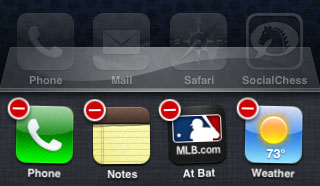
iOS app dock delete

Over time iOS may slow down or even do some strange things, which could mean several different things. Before you rush to Apple or go through the trouble of a complete restore with iTunes, try these steps and see if your iPhone or iPad starts running more smoothly.

iPhone 5 Concept Pushes the Limits of Reality

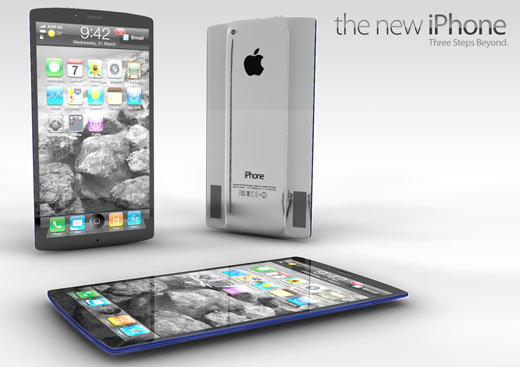
With all the recent talk of a 4.6-inch iPhone screen in the works, Italian design studio ADR has released a new iPhone 5 concept. The latest renderings from ADR are impressive, although they truly push the limits of what's possible.

iPhone 5 rendering concept ADR

Maybe this is why we like them so much! Not only does the concept show off a massive Retina display, but the front of the device actually consists of three separate screens. The top and bottom displays are narrow and consistently show the same information. This provides more space for the main screen to run apps.

Apple Considering an All-Glass Future iPhone?

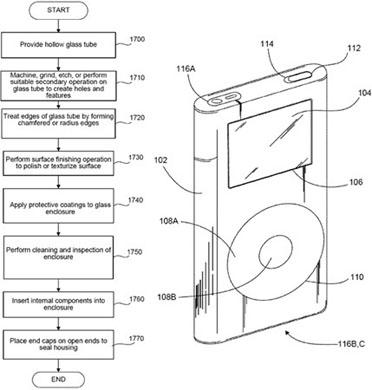
Many were surprised when Apple revealed the glass-backed iPhone 4. After all, even though glass provides a smooth and brilliant touch screen surface, fingerprints and risk of breakage are constant problems. An Apple patent filing from last September shows that Apple is considering doubling down on glass as the main device enclosure material.

iPhone 5 Glass enclosure

In short, this means that a future iPhone or iPod touch could be made entirely of glass, with the electronic components nestled inside. Some parts, such as the front screen, would be transparent. The rest of the mobile device would be painted, like the current iPhone 4/4S back and front bezel are made white or black.

Yelp Gets Improved Siri Integration on iPhone

Thanks to iOS 5.1 the relationship between Siri and Yelp just got a little bit closer. The iPhone 4S has used Yelp from the beginning to provide answers to all of your questions surrounding local businesses, especially restaurants and bars. The latest firmware update provides more interaction from the results that Siri pulls up from Yelp.

Yelp gets more Siri integration

Now with the Yelp iPhone app installed, tapping a business listed in Siri's search results will bring you directly to the business in Yelp. This provides full access to all of the pertinent information you may need before heading over to that address, such as hours of operation, review details, and photos.

How to Use AirPlay With Any iPhone Music App

The ability to stream music from your iPhone directly to speakers or an AirPlay-enabled device like the Apple TV is one of the perks of iOS. Some music apps, like Pandora, include a handy AirPlay button that makes turning on streaming simple. So how do you get other music playing applications on the iPhone to use AirPlay?

apple iphone airplay dock control iOS 5

Just because the app developer didn't include the AirPlay button directly in the app interface doesn't mean you're out of business. Apple has included a default AirPlay switch in iOS along with volume controls on the multitasking dock. Accessing AirPlay from any music app is possible as long as your AirPlay-compatible devices are properly configured on your Wi-Fi network.

Pages

Subscribe to The iPhone FAQ RSS