Tips

How to Turn iPhone Burst Photos into Animated GIFs

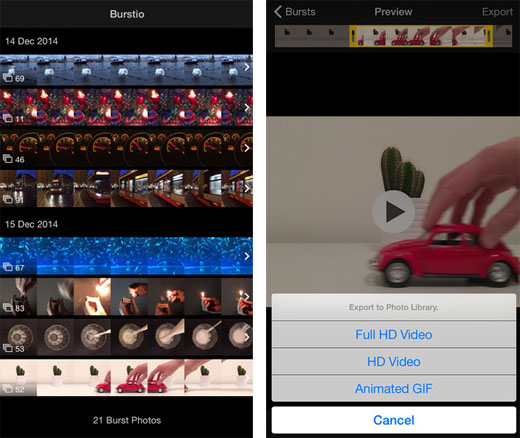
Ever notice how groups of photos taken in Burst Mode resemble the frames of a video? This comes as no surprise, as the images are captured at high speed. Now the app Burstio makes it possible to create a video or animated GIF directly from a burst group. The process is straightforward; simply open the app and select the Burst Mode photos to use.
iOS burst photo converter Burstio”  title=

The preview can be trimmed, using the same interface used to trim video length. Once the desired frames are selected, touch Export and a menu will appear. Animated GIF will create a 320x240 animated GIF, which can be saved to the Photo Library or shared. There are also options to save your work as a Full HD Video or an HD Video. Options to increase or slow the playback speed are also provided, for special effects.
Interrupt iOS Messages from Sending with SendDelay

Tapping the Send button accidentally can make for some embarrassing messages. Even worse is realizing as a message is being delivered that it's going to the wrong person. iOS has no way to stop the message or delay sending, until now. Enter the jailbreak tweak SendDelay.

iOS 8.1 jailbreak SendDelay stop send

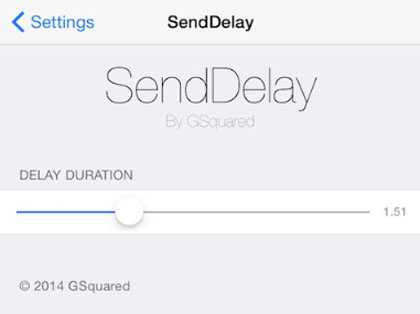
Other tweaks such as DoubleCheck can help to reduce messaging errors, however SendDelay actually postpones message delivery. This creates a window of time during which the message can be stopped. As delivery is happening, the Send button actually turns into a Stop button, which can be used to stop sending.

Make Sure Apps Fit the iPhone 6 and iPhone 6 Plus Display

The iPhone 6 marks the second time Apple has expanded the iPhone display size. When the iPhone 5 increased screen real estate, it took some time for developers to complete updates to existing apps. Optimized for the iPhone 5 was a common refrain in the App Store. In the meantime, many apps were simply letterboxed to allow them to function properly.

iOS 8.1 jailbreak ForceGoodFit

There are still many apps that have not been optimized for the iPhone 6 and iPhone 6 Plus displays. These screens are significantly larger than the iPhone 5 family of devices, and in some cases the old apps just don't look right. Thanks to the tweak ForceGoodFit, jailbreakers can enhance the usability of older apps on the iPhone 6 and iPhone 6 Plus.

Fix iOS 8 Wi-Fi Problems with This Tweak

Some iOS 8 users have reported Wi-Fi problems such as slow speeds and other performance issues. Developer Mario Ciabarra suspects the Wi-Fi inconsistencies are because Apple is "using Bonjour over AWDL" and "constraints" of the Wi-Fi hardware make this difficult. Click here to see Mario's detailed write-up on the issue.

iOS 8.1 jailbreak Wi-Fi problems

The good news for those with jailbroken iOS 8 devices is Mario has released a tweak called WiFried to solve the problem. Once installed, WiFried provides a toggle in Control Center AirDrop settings. The toggle will disable AWDL (Apple Wireless Direct Link) support, allegedly improving Wi-Fi performance. Note that while AWDL is disabled, AirDrop will not be available.

How to Disable Read Receipts in WhatsApp

WhatsApp users are normally notified when a sent message is read by the recipient. Much like iMessage shows the time that an outgoing message was read, two blue check marks appear after a WhatsApp message is read. While Messages can be configured to keep read status private, disabling read receipts in WhatsApp is a more complicated proposition.

iOS 8.1 jailbreak WhatsApp icon

Those with stock iOS 8 devices can use a trick to prevent WhatsApp from reporting read receipts. Once a new message notification arrives, switch the device into Airplane Mode. Read the message in WhatsApp, then quit the app. Finally, turn Airplane Mode off.

Pages

Subscribe to RSS - Tips