Lightning to Micro USB Adapter Now Available in the U.S.

Apple is now offering Lightning to Micro USB adapters to help customers cut down on their growing piles of cables. The adapter allows users to connect the Lightning connector to a micro USB cable to sync and charge the iPhone, iPad, or iPod. The new adapter is available for $19 via Apple's online store, and should be available at brick-and-mortar locations soon. Apple also offers Lightning to 30-pin adapters for $29, and Lightning to VGA adapters for connecting to VGA-equipped TVs, monitors, or external projectors for video mirroring. The VGA Adapter is $49.
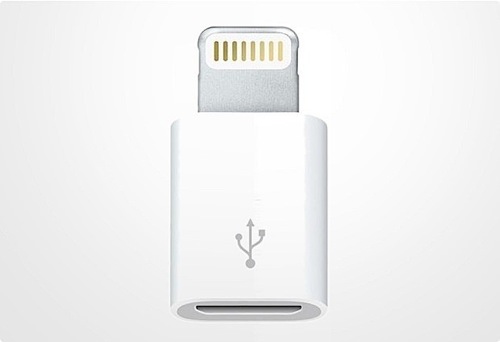

iPhone 5 Adapter

Native iOS 6 Emoji Support Makes Apps Redundant

Not too long ago, iPhone owners outside of Japan needed an app to unlock emoji characters, otherwise known as emoticons with their own special keyboard. Now that iOS 6 has launched the feature is no longer restricted to a particular country.

emoji apps iPhone banned

This means that many apps that existed to provide access to emoji are no longer needed. Turning on emoji is simple, requiring only a few easy steps. Apps like Emoji Free! have over 40 million users who have used the trick to unlock emoji ahead of the iOS 6 release.

AT&T Locker App Offers Cloud Storage for iPhone

Now you can get 5 GB more free cloud storage directly from AT&T. The wireless carrier has released AT&T Locker for iOS to help iPhone and iPod touch users easily access the service. Storing, syncing and sharing data is all consolidated in one place in the app.

AT&T Locker iOS app

Version 1.0.2 supports devices running iOS 4.3 or later including the iPhone 3GS. Photos and videos can be backed up automatically from your mobile device, and of course you can access all of your content and files from a computer as well. AT&T is looking to give services including iCloud, Dropbox and Google Drive a run for their money.

Apple Releases iOS 6.0.1: Fixes Keyboard and Camera Flash

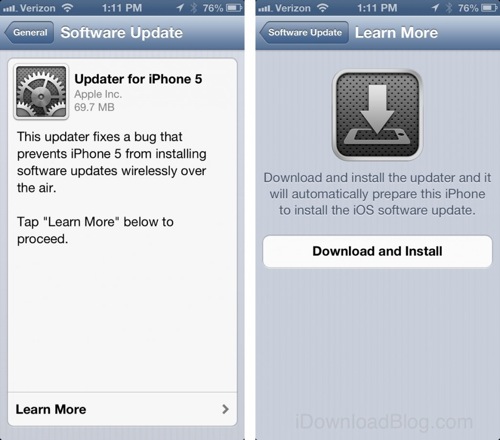
Apple has released iOS 6.0.1 for all iOS devices including the 4th generation iPad and iPad mini. iPhone 5 owners will need to download an app called "iOS Updater" to access the over the air update. iOS 6.0.1 fixes a bug that prevents the iPhone 5 from installing wireless updates. To download the Updater go to Settings >> General >> Software Update, and tap “Learn More” on the "Updater for iPhone 5" page to access the download screen.

iOS Firmware Update

Here's the complete changelog for iOS 6.0.1. You'll notice it's mostly a maintenance release.

-Fixes a bug that prevents iPhone 5 from installing software updates wirelessly over the air
-Fixes a bug where horizontal lines may be displayed across the keyboard
-Fixes an issue that could cause camera flash to not go off
-Improves reliability of iPhone 5 and iPod touch (5th generation) when connected to encrypted WPA2 Wi-Fi networks
-Resolves an issue that prevents iPhone from using the cellular network in some instances
-Consolidated the Use Cellular Data switch for iTunes Match
-Fixes a Passcode Lock bug which sometimes allowed access to Passbook pass details from lock screen
-Fixes a bug affecting Exchange meetings

iPhone 5 invisibleSHIELD Review: How to Install

ZAGG is known for making high quality products that protect your mobile electronics without bulk. We've done in-depth reviews of the invisibleSHIELD for iPhone in the past. iPhone 5 owners are now concerned about Scuffgate and the anodized aluminum possibly scratching to expose bare metal.

ZAGG invisibleSHIELD iPhone 5 photo introduction

One way to protect the iPhone 5 and avoid the extra size and weight of a case is to install an invisibleSHIELD from ZAGG. Not only are these premium screen and body protectors durable, they are actually made of the same material used to protect military helicopter blades.

Pages

Subscribe to The iPhone FAQ RSS