OS X Leopard Notes Don't Sync with iPhone

A few weeks ago, it was reported by Mac OS X Leopard beta testers that Leopard's mail included notes feature akin to the Notes program on the iPhone. The optimistic, and somewhat logical, hope at the time was that notes on the iPhone would sync with notes in the new Leopard version of Mail. In fact, note syncing was even listed at one time in Apple's feature list for Leopard. Unfortunately, that doesn't seem to be the case.
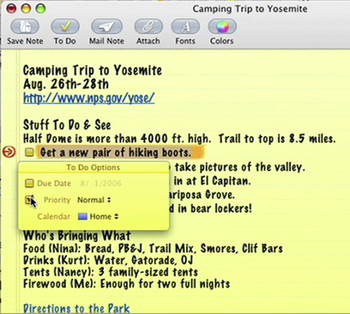
leopard mail has notes

According to a review of Leopard published by ITworld, though the Notes in Leopard and on the iPhone make look the same, smell

O2 Already Setting Up iPhone Store Displays

Although you wouldn't say the November 9th launch of the iPhone on O2 in the UK is "right around the corner," that's not stopping O2 stores from getting their iPhone displays up. In preparation for what is certain to be a very energetic lanch in the UK, O2 stores around the country have begun dressing up for the release.

A MacRumors forums member, DogcowUK, recently snapped the above shot of an employees at an O2 store in Birkenhead, Merseyside setting up their in-store display:

How can I setup IMAP for GMail on my iPhone?

Google has recently added IMAP as an available protocol for their GMail. This is a long awaited feature for GMail users (not just GMail iPhone users) as it allows for true synchronization between GMail and offline mail readers.

UPDATE: Now iPhone users can simply choose "GMail" from the list of built-in accounts when adding a new email account. Navigate to Settings -> Mail, Contacts, Calendars -> Add Account -> Gmail and enter your account Address and Password. Touch "Save" and it will connect automatically.

Old information follows:

Google has offered two sources of easy to follow instructions, a text version and a video, for setting up GMail reading via IMAP on the iPhone. Both are copied below:

tags: 

iFuntastic 4.6.1 Released, Works with iPhone Firmware 1.1.1

The long awaited update to the popular iPhone jailbreaking, application installation, and iPhone customization software, iFuntastic, is now available. This latest version, 4.6.1, offers the most automated jailbreaks (which iFuntastic likes to call "unshackling") for 1.0.2 and 1.1.1 iPhones that we've seen thus far. Still required are plenty of restarts and switching back and forth with iTunes, but the instructions jailbreak process through iFuntastic seems to be the easiest to follow.

Review: Aliph Jawbone and the Apple iPhone

The Bluetooth version of the Jawbone headset from Aliph is one of the best selling and highest rated BT headsets on the market. Though also marketed as the stylish man's Bluetooth headset, the Jawbone is sold mainly based on lofty claims made by manufacturer Aliph about the Jawbone's noise reduction/elimination technology. According to Aliph, this "revolutionary Noise Shield technology combines the latest innovations in acoustics, audio processing and product design to produce a quantum leap in headset performance."

aliph jawbone bluetooth headset

Outlets such as CNET (who gave the Jawbone it's highest ever ranking for a Bluetooth headset), Walt Mossberg of the WSJ, and the Financial Times have already given the Jawbone rave reviews. Regardless, I was skeptical. You see, I've tried many other Bluetooth headsets that were positively reviewed. However, I've never found one of them the least bit useable or practical. Sound quality is always lousy (both in and out), pairing is often difficult and unreliable, and most headsets are downright unwearable because of comfort or fit issues.

So, I figured I'd give the Jawbone a try.

When the package arrived, I was certainly eager to give it a shot. The Jawbone lures you in with it's

Pages

Subscribe to The iPhone FAQ RSS